If you’re weighing G-Accon vs FinOptimal for your QuickBooks Online practice, you probably have two complaints about spreadsheets. You rebuild the same reports every month-end, and you type entries into QuickBooks that are already sitting in a sheet somewhere.
G-Accon and FinOptimal both help with that, but they sell it in very different ways. FinOptimal gives you a separate app for each job and bills it on every client file, while G-Accon puts both jobs in one plan. With three clients you'd barely notice the difference, but with thirty you'll see it on every bill.
So which one should you pay for? We'll get there, but first let's look at what each tool actually does and what the bill looks like once your client list grows.
“
The Short Answer
If your team lives in Google Sheets and needs reports, consolidation, and uploads for a pile of clients, G-Accon is the easier pick, since you pay one price based on how many companies you manage. FinOptimal makes more sense if accruals swallow your month-end, or if you'd rather hand the books to someone else entirely.
The price gap comes down to packaging. G-Accon's Accountant plan covers up to 25 companies for one monthly fee, whereas FinOptimal charges for each app on each QuickBooks file. That's fine at three clients, but at twenty it adds up quickly.
It isn’t only about price, either. G-Accon also gives you KPI dashboards, budgeting and forecasting, and multi-company consolidation, and you won’t find any of those in Wrangler, FinOptimal’s reporting app.
G-Accon is a Google Sheets add-on that connects to your books. Your QuickBooks numbers come into a sheet, you work with them there, and if an entry is wrong you can fix it in the sheet and send it back. Most of the people who use it are accountants and bookkeepers who already do a lot of their work in Sheets.
Reporting, consolidation, and two-way workflows in Google Sheets
Say your firm closes the books for a dozen clients. You can pull their live QuickBooks reports into Sheets and start from one of more than 100 templates rather than a blank tab. You can also combine several clients into a single report, and currency isn't an issue because G-Accon supports more than 170 of them.
Once a report is set up, you can have it refresh every hour, day, or week and email it out as an Excel, PDF, or CSV file. On top of that, you can turn the numbers into KPI dashboards in one click, build budgets and forecasts, and feed the data into Power BI, Looker, or Tableau when a client wants something more visual.
It works in the other direction as well. If you've got journal entries, invoices, or bills in a sheet, you can upload them to QuickBooks instead of entering each one by hand.
G-Accon only works in Google Sheets, so there's no Excel version. You can still export a finished report to Excel if a client asks for one, though.
One plan instead of separate apps
This is where the two tools part ways the most. G-Accon doesn't sell reporting and uploads as two products, so every plan gets the same toolbox and you won't wake up one day needing an upgrade just to send invoices. The only thing you pick is how many companies you need.
What FinOptimal Is Built For
FinOptimal is a family of QuickBooks Online apps that you buy one by one, and it also sells a done-for-you bookkeeping service. The company is an accounting firm itself and built these tools for its own staff, which shows in how each app does one job and stays in its lane.
Accruer, Booker, and Wrangler as separate apps
Right now FinOptimal has three apps. Accruer is the one for accruals, covering prepaid expenses, deferred revenue, fixed assets, and payroll. Booker uploads spreadsheet data to QuickBooks and can also pull it back out if you want to bulk edit. Wrangler brings QuickBooks reports into a spreadsheet and keeps them updated.
Booker and Wrangler work in either Google Sheets or Excel. Accruer is different because it runs against QuickBooks directly, so you export its schedules if you want them in a sheet. FinOptimal also lists two apps as coming soon: one for bank reconciliation and one for AI close automation.
Managed accounting and the Magic Bundle
FinOptimal also offers managed accounting, where its own team uses those same apps to keep your books closed for a flat fee based on a custom scope of work.
If you want all three apps, there's the Magic Bundle: Accruer Unlimited, Booker Unlimited, and Wrangler together, starting at $339 a month per QuickBooks file.
Reporting Compared
Both tools get QuickBooks reports into a spreadsheet, but G-Accon goes much further, with KPI dashboards, multi-company consolidation, and scheduled delivery on every plan, plus a new budgeting and forecasting tool.
G-Accon versus Wrangler reporting and consolidation
Getting reports into a sheet is the easy part, and both tools do it. For a firm with lots of clients, the real time savers in G-Accon are these:
Scheduling. Reports update on your timetable, so nobody has to open the sheet and hit refresh.
Delivery. Finished reports go out by email on a schedule.
KPI dashboards. Build single-company or consolidated KPI dashboards in one click, so you’re not designing charts from scratch for every client.
Budgeting and forecasting. G-Accon’s budgeting tool lets you set up budgets and forecasts in Sheets and compare them with what actually came through QuickBooks.
Wrangler is a solid report tool in its own right. It runs every standard QuickBooks report, plus custom queries and a detailed report FinOptimal calls the Magic Report. Refreshes and users are unlimited, you can put your own branding on reports, and it works in Google Sheets or Excel for $99 a month per QuickBooks file.
What G-Accon has that Wrangler doesn’t
Where Wrangler stops is anything past the reports themselves. If you want client dashboards, budgets you can track against actuals, or several entities rolled into one view, G-Accon handles all of that out of the box, while Wrangler doesn't offer any of it. Here's how the two line up on the features firms tend to ask about.
Feature
G-Accon
FinOptimal Wrangler
KPI dashboards (single and consolidated)
Yes, built in one click
No
Budgeting and forecasting
Yes
No
Multi-entity consolidation
Yes, with intercompany eliminations
No
Multi-currency
Yes, 170+ currencies
No
BI reports for Power BI, Looker, Tableau, and similar tools
Yes
No
Annotations
Yes
No
Auditing
Yes
No
Open API
Yes, with the Plus add-on
No
Data backups for month-end reconciliation
Yes
No
Email notifications
Yes
No
Webhooks
Yes
No
Custom branding
Yes
Yes
Custom queries and automated refreshes
Yes
Yes
Spreadsheet Data Uploads Compared
Both tools push spreadsheet records into QuickBooks, but G-Accon includes its full list of uploads on every plan, while FinOptimal splits them across two Booker tiers.
G-Accon versus Booker two-way workflows
Every tool in this space says it "supports uploads," but that phrase hides a lot. We'd look at two things: which records you can send, and whether you can fix or delete them later. Here's the breakdown.
Bills, bill payments, expenses, purchase orders, vendor credits
No
Bills, expenses, checks
Lists
Accounts, customers, vendors, items, classes, locations, employees, terms, and more
No
Customers, vendors, classes, and more
Other
Budgets, transfers, time activities, scheduled uploads
Journal entries only
Bulk edit QuickBooks data
Spreadsheet
Google Sheets
Google Sheets or Excel
Google Sheets or Excel
What you can do with an upload depends on the record type. Journal entries can be added, changed, or deleted, while bills can be voided and accounts can be added or updated. If your team posts the same rent or depreciation entries every month, you can also schedule the upload and let it run on its own.
This is FinOptimal's home turf. Accruer automates accrual schedules, and FinOptimal's team can run your books for you. G-Accon doesn't try to do either, because it's built to make your own team faster, not to replace it.
Where FinOptimal covers a different job
Accruer is built for accruals. It creates and posts the entries for prepaid expenses, deferred revenue, fixed assets, and payroll. The price is per QuickBooks file and depends on how many accruals you run in a month, starting at $29 for up to 10. It goes to $99 for up to 50, and $199 gets you unlimited.
Managed accounting is a different animal altogether, because you're paying for people rather than software, and FinOptimal's staff take over the bookkeeping and the month-end close.
G-Accon doesn't run your books, but it does give your team the reports and uploads that help them close faster. If you already track accruals in a spreadsheet, you can use G-Accon to upload those journal entries to QuickBooks. The only catch is that the schedule itself stays your team's job.
Accounting Platform Coverage
FinOptimal is a QuickBooks Online shop, full stop. Besides QuickBooks Online, G-Accon also works with Xero and Xero Practice Manager, as well as Sage Accounting and FreshBooks.
This is a big deal if some of your clients use Xero. You can give them the same reports and uploads your QuickBooks clients get, set up the same way in Google Sheets, and your staff won't have to learn a second tool. Each platform does need its own G-Accon plan, so a firm using both pays for two. See G-Accon for Xero for the Xero side.
FinOptimal says Accruer works only with QuickBooks Online for now, though other systems may be supported later, so until then any Xero clients would need a separate tool.
G-Accon vs FinOptimal Pricing for Accounting Firms
G-Accon charges one plan price based on how many companies you manage, while FinOptimal charges per app, per QuickBooks file. For firms with a long client list, that makes G-Accon's list price far lower.
One plan versus separate apps
With G-Accon, reports and uploads share one plan, so there's no second product to add when a second job comes up.
With FinOptimal, every app is its own subscription, so getting reports and uploads means paying for both Wrangler and Booker. To be fair, FinOptimal doesn't charge per user, which helps larger teams.
Plans by company count versus per QuickBooks connection
Outgrow your plan by a client or two? You don't have to jump a tier, since each extra company costs $10 a month and each extra user costs $20.
FinOptimal prices its apps per connected QuickBooks file, which means every client file needs its own subscription and the bill climbs with each new client. The FinOptimal figures in this article are its published list prices, although accounting firms can fill out a form to ask for discounted pricing.
A worked example
Let's put real numbers on it. Say a firm needs live reports and spreadsheet uploads, and:
Every client has its own QuickBooks Online file.
No more than 5 staff use the tool.
The firm doesn't need Accruer.
FinOptimal is priced at its public monthly list price, since its firm discount isn't published.
Firm size
G-Accon Accountant plan
FinOptimal: Booker Lite + Wrangler
FinOptimal: Booker Unlimited + Wrangler
10 clients
$150/mo ($125/mo billed yearly)
$1,980/mo
$2,480/mo
25 clients
$150/mo ($125/mo billed yearly)
$4,950/mo
$6,200/mo
One thing to watch is that Booker Lite only handles journal entries. If you also need to upload invoices and bills, Booker Unlimited is the fair comparison, and G-Accon's Accountant plan covers both.
Your FinOptimal quote may come in lower once you ask for firm pricing, but the shape of the bill doesn't change. FinOptimal's cost goes up with every new file, while G-Accon stays flat until you outgrow your plan, so taking on a new client doesn't mean a new line on your software bill.
Can G-Accon and FinOptimal Be Used Together?
Yes, and because both connect to QuickBooks Online, a firm could run Accruer for accrual schedules and G-Accon for reporting and uploads.
That pairing makes sense when accruals take a big, steady bite out of your team's time. The flow is simple: Accruer posts the accruals, then G-Accon picks up the fresh numbers in Google Sheets, and your team takes it from there with reports, consolidations, and scheduled emails. You'd pay for Accruer per file and for one G-Accon plan across all your clients.
G-Accon vs FinOptimal: Which Option Fits Which Firm
For most multi-client firms that want reports and uploads in Google Sheets, G-Accon gives you more for less, although FinOptimal is worth a look if accruals are your biggest headache, or if you'd like to hand off the books entirely.
G-Accon is probably your tool if you manage a lot of client companies and want one bill you can predict. It's also a good choice if you need reports and uploads, or if you often combine several companies into one report, build KPI dashboards for clients, or track budgets against actuals. Firms with a few Xero, Sage, or FreshBooks clients will find it useful too, and if your team already uses Google Sheets all day, there's not much to learn.
FinOptimal is the better call in a few cases, such as when your team loses hours every month to accrual schedules, when you'd like an outside team to do the bookkeeping and the close, or when your firm simply runs on Excel.
And if accruals are only one piece of the puzzle, you can always pair Accruer with G-Accon. Comparing other QuickBooks reporting tools too? Read G-Accon vs LiveFlow next.
Getting Started
You can try G-Accon free for 14 days, and you won't need a credit card.
The easiest way to test it is to install the add-on and connect one QuickBooks file. Pull a P&L into Sheets, then try sending one journal entry back. Give it an afternoon, and by the end you'll know whether it saves your team real hours.
FinOptimal doesn't list a free trial, but it offers a 60-day money-back guarantee, and you can cancel at any time.
Yes, for reporting and spreadsheet uploads, since G-Accon covers the work Wrangler and Booker do inside one Google Sheets plan, and it adds KPI dashboards, budgeting, and consolidation that Wrangler doesn't have. It isn't a replacement for Accruer or FinOptimal's managed accounting service.
Can I upload journal entries from Google Sheets to QuickBooks with G-Accon?
Yes. G-Accon can insert, update, and delete journal entries in QuickBooks, and it can also upload invoices, bills, payments, customers, vendors, and many other record types. Uploads come with every plan.
Can I use G-Accon for my Xero clients too?
Yes, and Xero is only one of the options. G-Accon also connects to Xero Practice Manager, Sage Accounting, and FreshBooks, though each platform you add comes with its own plan.
Does FinOptimal work with Google Sheets and Excel?
Booker and Wrangler both work with Google Sheets and Excel, while Accruer runs against QuickBooks and creates schedules you can export at month-end.
How much does FinOptimal cost for accounting firms?
FinOptimal prices each app per QuickBooks file: Accruer runs $29 to $199 a month, Booker is $99 or $149, and Wrangler is $99. The Magic Bundle starts at $339, and firms can ask for discounted pricing through a form on FinOptimal's site.
Does FinOptimal Wrangler have KPI dashboards or budgeting?
No. Wrangler pulls QuickBooks reports into a spreadsheet and keeps them updated, but it doesn’t offer KPI dashboards, budgeting and forecasting, multi-entity consolidation, or multi-currency reporting. G-Accon includes all four, along with BI reports, annotations, auditing, email notifications, and webhooks.
If you look after the books for more than one company, you know the month-end routine. Log in to the first company. Run the report. Export it and paste it into a spreadsheet. Then do it all again for the next company, and fix the formula that broke because someone renamed an account.
G-Accon's Consolidated KPI Dashboard takes that routine off your plate. You fill in one setup panel in Google Sheets and click Generate. G-Accon then builds the consolidated reports, the dashboards and a cover page for you. It even schedules a daily refresh on its own, so tomorrow's numbers show up without anyone opening the file.
It works in both G-Accon for QuickBooks and G-Accon for Xero. Below is the full process, in the same order G-Accon walks you through it.
You end up with one Google Sheets workbook that pulls together the financials of every company you choose. QuickBooks users get a consolidated Profit and Loss, Balance Sheet and Cash Flow report. Xero users get the consolidated Profit and Loss and Balance Sheet.
Included in your workbook
QuickBooks
Xero
Consolidated Profit and Loss
Yes
Yes
Consolidated Balance Sheet
Yes
Yes
Consolidated Cash Flow
Yes
No
KPI, Financial Ratios and P&L Variance dashboards
Yes
Yes
Cover page, custom theme and logo
Yes
Yes
On top of those reports sit three dashboards. One tracks KPIs with charts, metrics and margins. Another covers financial ratios. The third shows P&L variances between your companies. A cover page links it all together, and you can brand the whole workbook with your own colors and logo.
Only one thing needs to be in place first. Your QuickBooks companies or Xero organizations have to be connected to G-Accon in Google Sheets. If they aren't yet, the QuickBooks integration and G-Accon for Xero pages explain how. Once that's done, you're ready.
How to Create Your Consolidated KPI Dashboard
The whole setup happens in a single panel. There are no tabs to plan, no formulas to write and no charts to build.
1
Step 1: Open Consolidated KPI Dashboards
In your Google Sheet, click:
Extensions → G-Accon for QuickBooks → Get Accounting Data/Reports → Consolidated KPI Dashboards
On Xero, the path is the same, except it starts with G-Accon for Xero.
Opening Consolidated KPI Dashboards from the G-Accon menu
2
Step 2: Choose a prebuilt template
The setup panel opens with a row of prebuilt dashboard styles. Each one already includes a cover page, dashboards and charts, so just pick the layout you like.
The setup panel, with the dashboard styles at the top
3
Step 3: Set the report currency
Choose the currency for your consolidated reports.
4
Step 4: Select your companies
Tick each company you want in the dashboard. You can pick several, and G-Accon rolls their numbers into one view. If your list is long, use the search box to find a company quickly.
Picking the companies to include
5
Step 5: Pick a date range
Go with Monthly, Quarterly or Custom, then set the dates using the calendar.
6
Step 6: Decide how many periods to show
Set how many periods the dashboard should include, and how many should appear in the accounting reports. For a year of monthly trends, for example, you'd choose 12.
7
Step 7: Choose a theme
Pick a pre-designed theme from the drop-down menu. If none of them fit your brand, create a custom theme with your own colors and styling.
Choosing a ready-made theme or building a custom one
8
Step 8: Add your logo
Upload your company logo from your computer. It shows up on the dashboard, the reports and the cover page, which is handy if the file is going to clients or a board.
9
Step 9: Click Generate
Now click Generate and let G-Accon do the rest. Using your companies, date range, periods and theme, it creates:
Consolidated Profit and Loss report
Consolidated Balance Sheet report
Consolidated Cash Flow report (QuickBooks only)
Consolidated Profit and Loss Dashboard with charts and financial metrics
Consolidated Financial Ratios Dashboard
Consolidated Profit and Loss Variance Dashboard
Cover Page
G-Accon also sets up the automatic refresh while it's at it. Out of the box, every report and dashboard updates once a day.
Clicking Generate to build the dashboard
Finding Your Way Around the Finished Workbook
Start on the cover page. Every report and dashboard is linked from there, so one click takes you where you need to go.
The cover page links to every report and dashboard
The consolidated reports
The consolidated Profit and Loss puts the income and expenses of all your selected companies into one report. The Balance Sheet does the same for assets, liabilities and equity. QuickBooks users also get a consolidated Cash Flow report, built the same way.
A consolidated Profit and Loss report for multiple QuickBooks companies
The three dashboards
01 KPI Dashboard
The KPI dashboard is where most people will spend their time. It lays out charts, graphs, financial metrics and margins for the whole group.
The Consolidated KPI Dashboard
02 Financial Ratios Dashboard
Next to it, the Financial Ratios dashboard covers your key ratios and margins, with its own charts and graphs.
The Consolidated Financial Ratios Dashboard
03 P&L Variance Dashboard
The P&L Variance dashboard compares profit and loss across your companies. If one entity is falling behind the others, this is where you'll notice.
The Consolidated Profit and Loss Variance Dashboard
How the Automatic Refresh Works
New users are often surprised to learn there's nothing to schedule. G-Accon creates the refresh workflow as soon as it builds your dashboard, and that workflow runs every day.
You can still change it if you want to. Everything lives inside G-Accon automation.
In QuickBooks
Extensions → G-Accon for QuickBooks → Automation → Edit/Delete Workflow
In Xero
Extensions → G-Accon for Xero → Automation → Update/Modify/Delete Workflow
Click the blue KPI Reports link to open the workflow G-Accon made for your dashboard. From there, you can move the refresh to a different time. Don't want to wait for the next run? Click Test Execution, and the update starts right away.
The KPI Reports workflow, with the refresh time and the Test Execution button
Checking that refreshes ran
Open the Automatic Operations Events Log to see every automatic run. Each one is listed with its status, and errors are flagged there too, so you can catch a problem before anyone works from old numbers.
The Automatic Operations Events Log
“
Key Takeaways
Setup takes one panel: template, currency, companies, dates, periods, theme and logo. Then you click Generate.
G-Accon builds the consolidated reports, all three dashboards and the cover page for you.
A daily refresh is created automatically. You can change its time or run it on demand from the KPI Reports workflow.
The Automatic Operations Events Log tells you whether each refresh worked.
Frequently Asked Questions
Do I need to build formulas, tabs or charts myself?
No. Fill in the setup panel, click Generate, and G-Accon builds the reports, dashboards, charts and cover page.
Does it work with both QuickBooks Online and Xero?
Yes, and the steps are the same. The one difference is the reports. QuickBooks users get consolidated Profit and Loss, Balance Sheet and Cash Flow. Xero users get Profit and Loss and Balance Sheet. Both versions include the KPI, Financial Ratios and P&L Variance dashboards.
How often does the data refresh?
Once a day by default. You can pick a different time in the KPI Reports workflow, or click Test Execution whenever you need fresh numbers.
What if my companies use different currencies?
You choose one report currency during setup. G-Accon's October 2026 release notes confirm that the dashboard applies currency conversion when your entities operate in different currencies.
Can I put my own branding on it?
Yes. Use a ready-made theme or design your own, then upload your logo. It appears on the dashboard, the reports and the cover page.
How can I tell if a refresh failed?
Check the Automatic Operations Events Log. It lists each workflow run with its status and shows any errors.
G-Accon's QuickBooks Budgeting Software
“
TL;DR
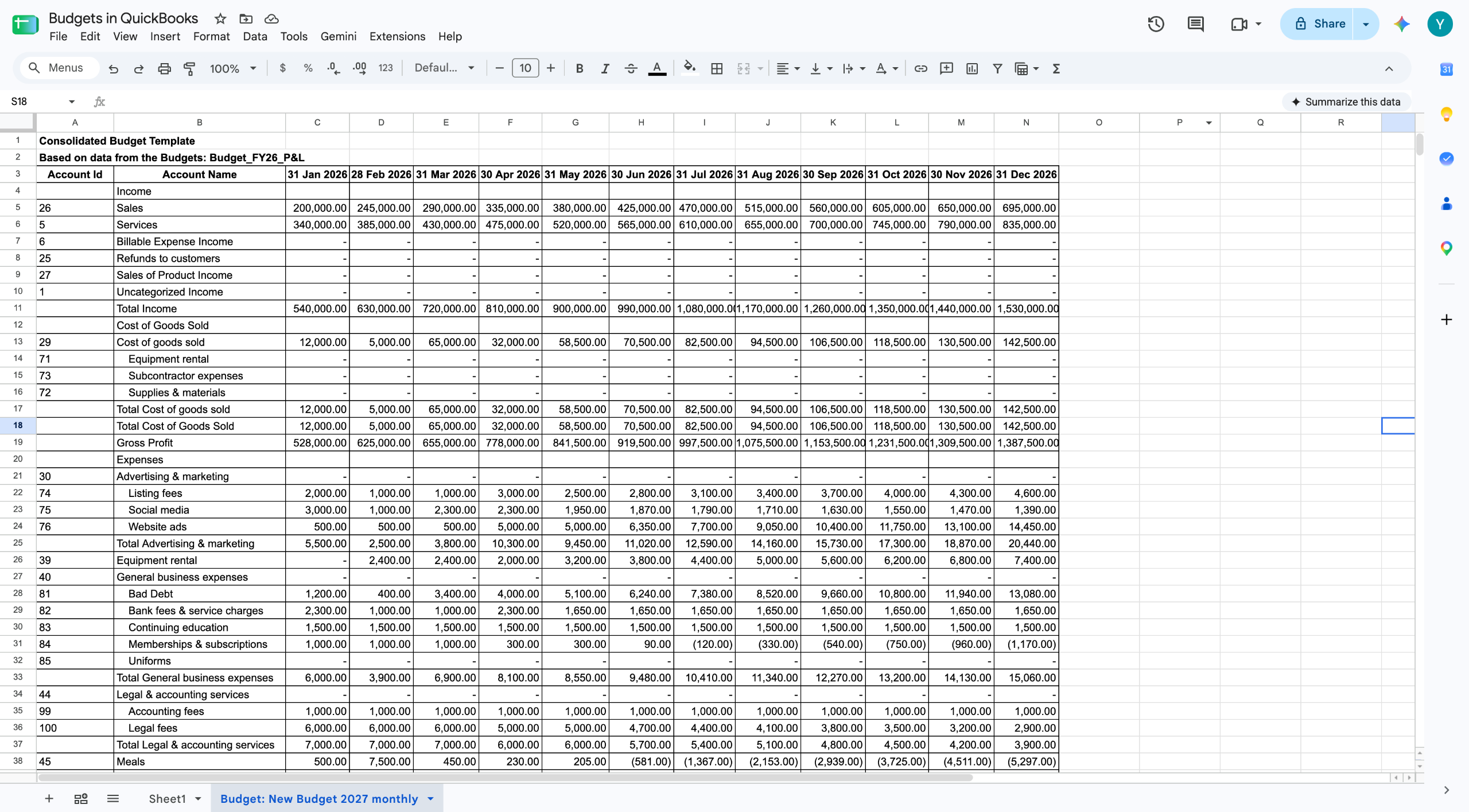
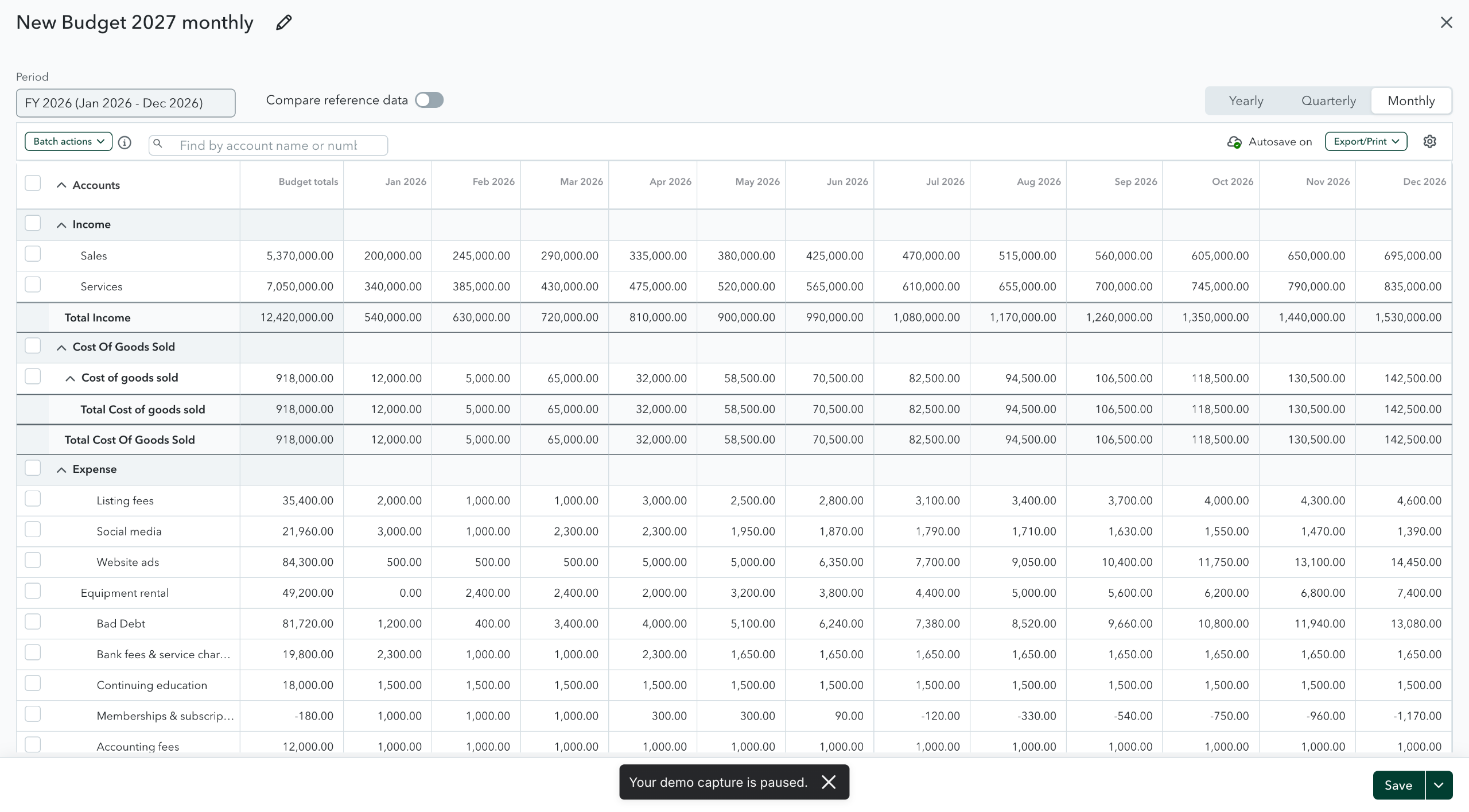
G-Accon's QuickBooks budgeting software, the new Budget Module, lets you build a QuickBooks budget inside Google Sheets and push it straight into QuickBooks. You can start from a template built on last year's actuals or an existing budget, so nobody opens a blank sheet.
As QuickBooks budgeting software, G-Accon also lets you download an existing budget back down, edit it, and re-upload it. Budgets can be subdivided by Class, Location, or Customer, and you can consolidate several budgets across years, classes, locations, and customers in one workbook.
Rather click than read? The whole workflow in this article is also published as an interactive Storylane demo. Same steps, same screens, at your own pace.
What Is G-Accon's QuickBooks Budgeting Software?
The Budget Module lets you build, edit, and consolidate QuickBooks budgets without leaving Google Sheets. It sits inside G-Accon for QuickBooks and was released in September 2026.
Before this, you had two options. Type the whole budget into the QuickBooks grid. Or build it in a spreadsheet and key it in again. Neither is fun when you run several companies, and the numbers change twice before anyone signs off.
This is aimed at accounting firms and finance teams who budget for more than one QuickBooks company. If you budget once a year for a single entity, the QuickBooks grid is probably enough. If you do it twelve times each autumn, read on.
What This QuickBooks Budgeting Software Does: Create, Modify, Upload, and Consolidate
The module covers the whole budget cycle, not just one step. Here is the full list:
Build a new budget in Sheets and upload it to QuickBooks
Generate a starting template from actuals or from a budget you already have
Set budgets up as monthly, quarterly, or yearly
Pull an existing QuickBooks budget into Sheets, change it, and send it back
Subdivide a budget by Class, Location, or Customer
Generate separate templates for chosen classes, locations, or customers
Consolidate several budgets, including ones from different years, classes, locations, and customers
One thing it is not. This module manages a budget you have already agreed on. It does not forecast or run scenarios. That work lives in G-CashFlow.
Where it lives inside G-Accon for QuickBooks
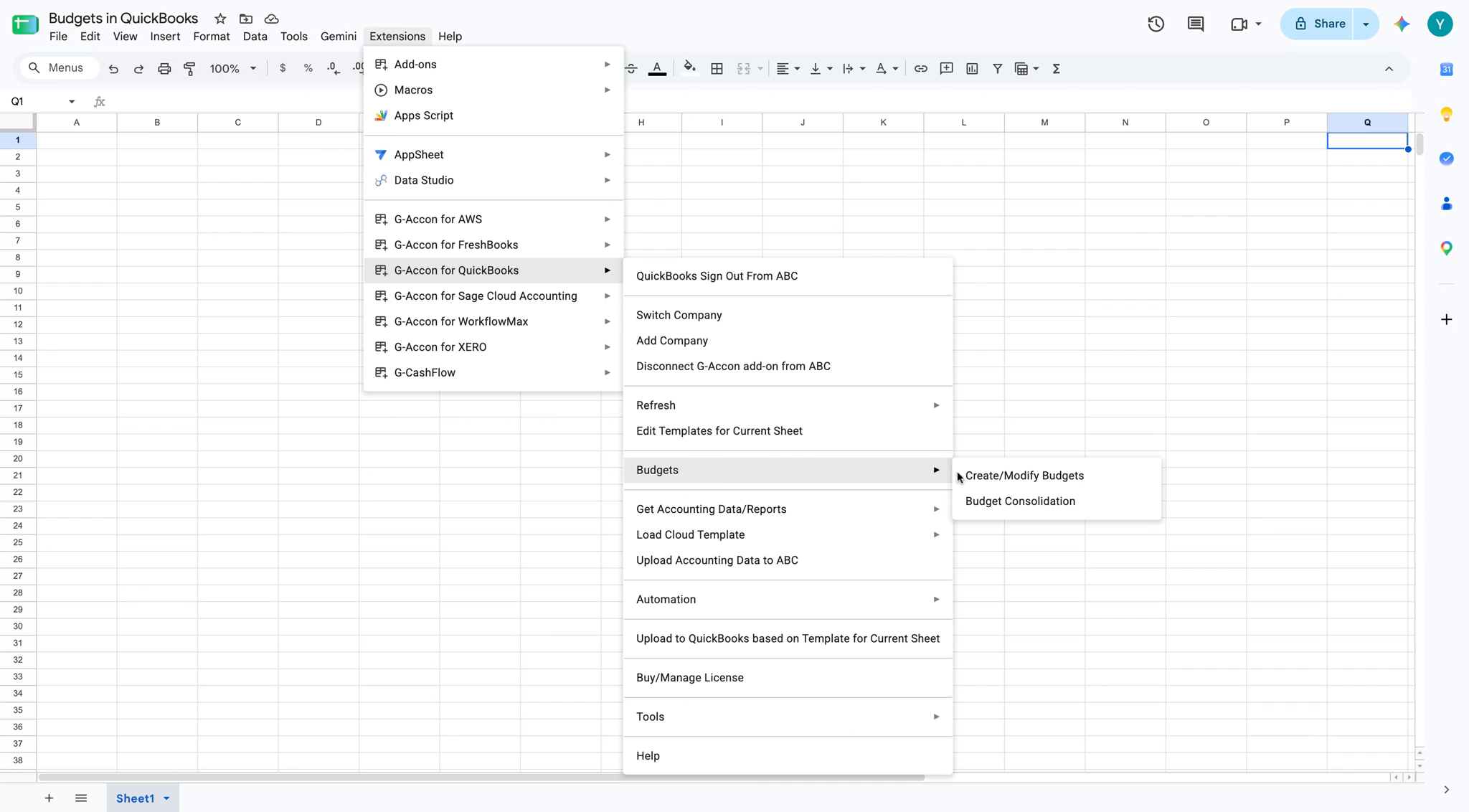
This QuickBooks budgeting software lives right inside your spreadsheet. Open your sheet and go to Extensions, then G-Accon for QuickBooks, then Budgets. You get two choices there: Create/Modify Budgets and Budget Consolidation. Almost everything in this article starts from the first one.
The Budgets menu sits under G-Accon for QuickBooks in the Extensions menu.
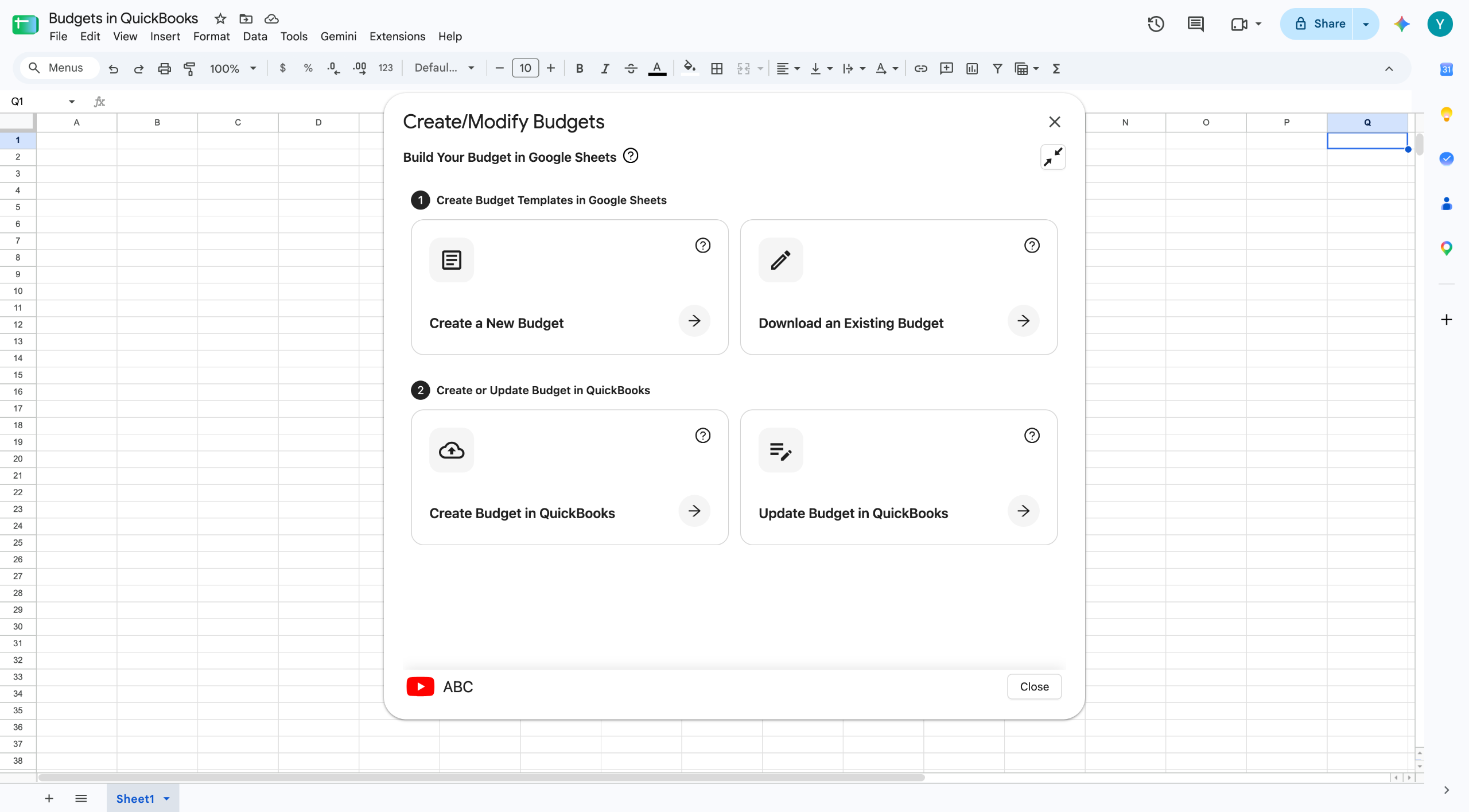
Create/Modify Budgets opens a panel with four options in two steps. Step one builds a template in Sheets. You start from scratch, or you download a budget that already exists. Step two sends it to QuickBooks, as a new budget or as an update.
Four options: create a template, download an existing budget, create a budget in QuickBooks, or update one.
How to Create a Budget With This QuickBooks Budgeting Software
Generate a template from actuals or an existing budget
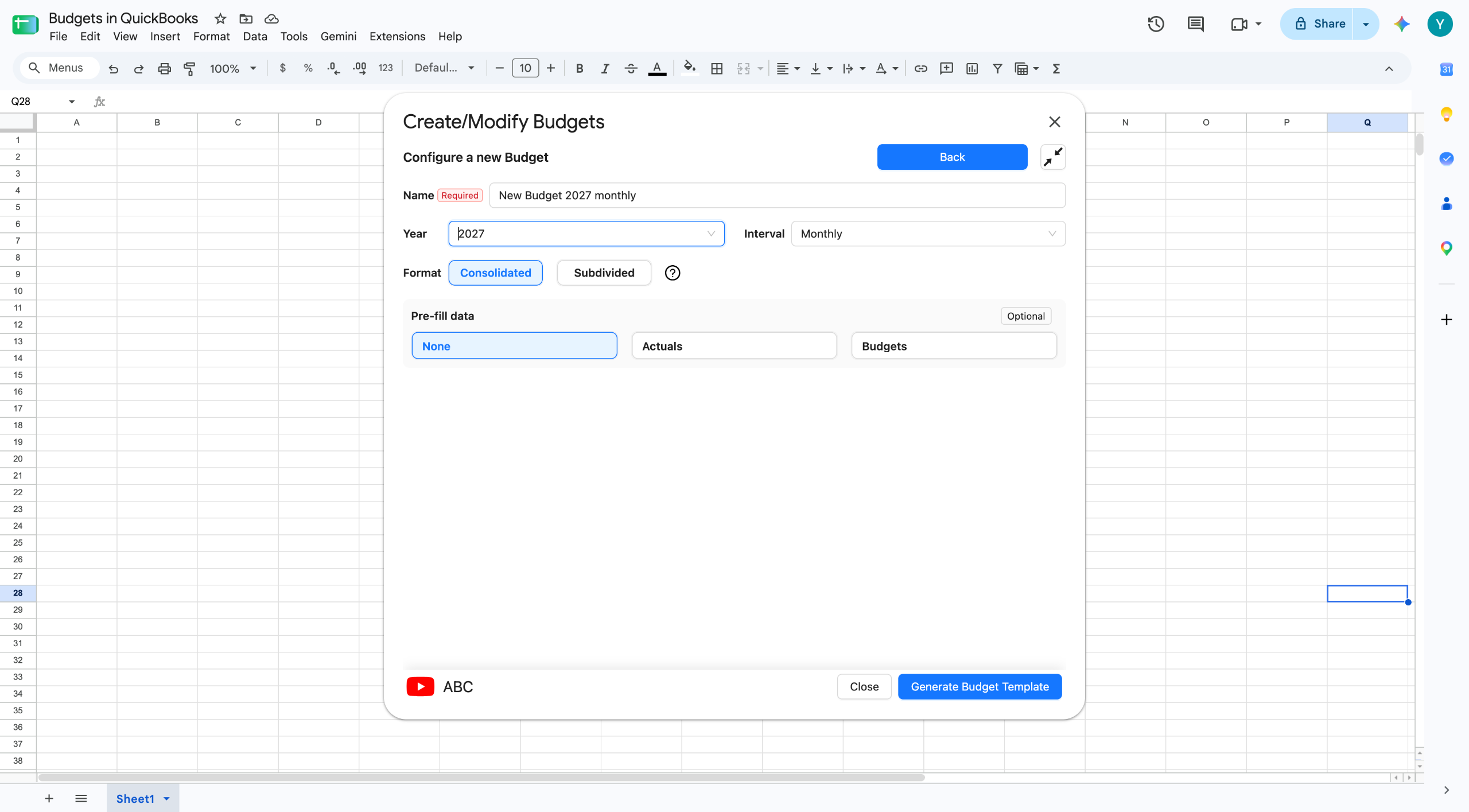
Pick Create a New Budget, then fill in the setup screen. Give the budget a name, choose the year, and pick the interval. Then choose the format, Consolidated or Subdivided. Last, decide what to pre-fill it with.
Pre-fill is worth slowing down on. You get three choices. None gives you an empty grid with the right accounts and months. Actuals fills it with what really happened. Budgets fills it from a budget you already have.
Name, year, interval, format, and pre-fill all sit on one screen.
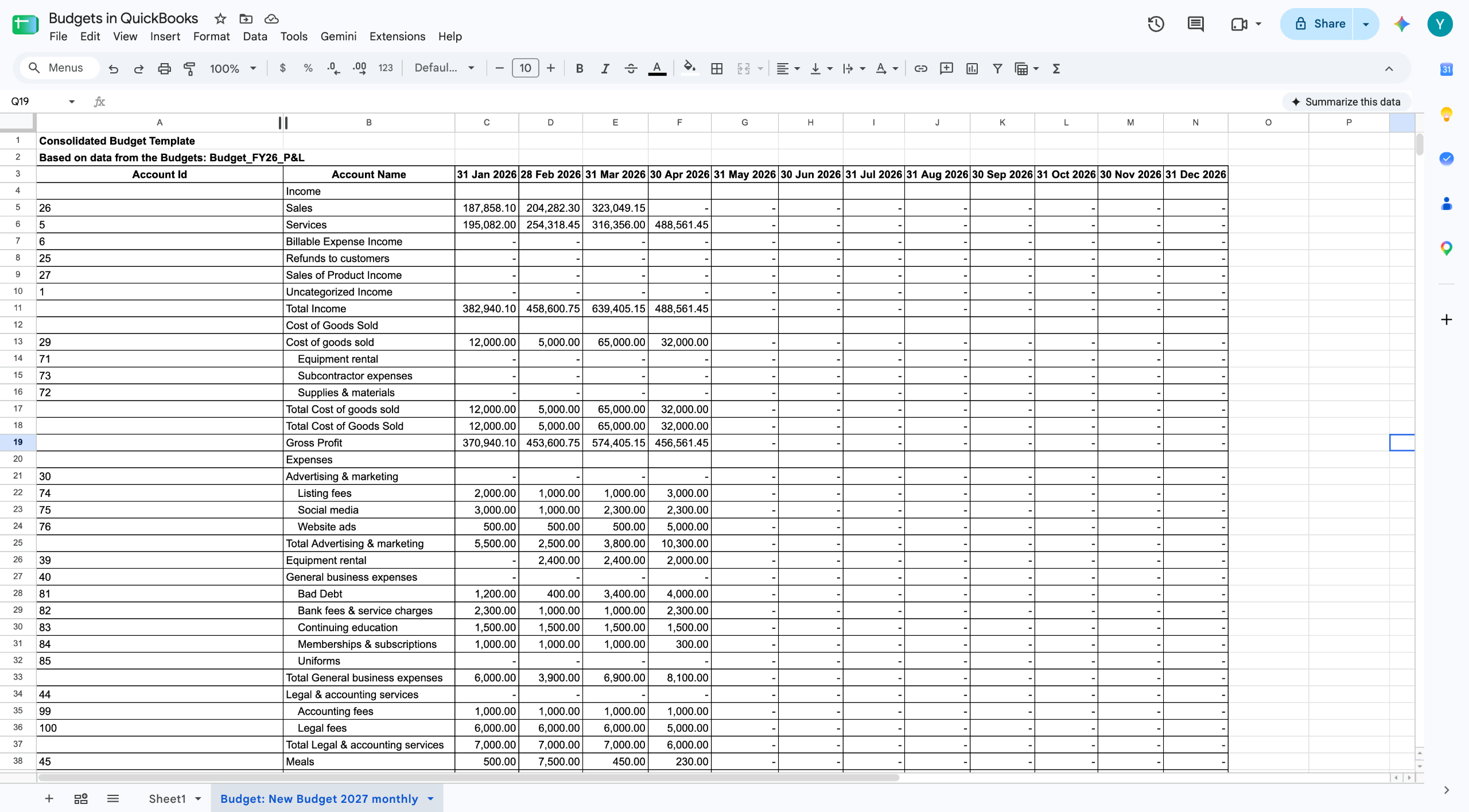
Most people plan next year from last year. Choose Budgets or Actuals, tick the source from the list, then click Generate Budget Template. G-Accon writes it onto its own tab in your workbook, already filled in.
The generated template, pre-filled with prior-year figures and laid out by account and month.
The template comes out with an Account Id column, an Account Name column, and one column per period. The account IDs matter. They are how G-Accon matches each row back to the right QuickBooks account on upload, so leave that column alone.
Everything else is just a spreadsheet. Type over the numbers. Use a formula. Add five percent across a row. Paste in figures your client sent you. Every cell is yours. That is the point of working in Sheets instead of a grid that takes one number at a time.
Updating the template with next year's revenue, cost of goods sold, and expense figures.
Set up monthly, quarterly, or yearly budgets
You set the interval on the same setup screen, before the template is built. Monthly gives you twelve columns. Quarterly gives you four. Yearly gives you one.
Pick based on how the budget gets used, not on how much typing you can face. If the client reviews the numbers every month, build it monthly. If it only exists for the bank once a year, yearly is fine. And since the template pre-fills from actuals, monthly costs you little extra anyway.
A quarterly budget works the same way. Choose Quarterly on the setup screen, enter the quarterly figures in the sheet, then upload it to QuickBooks. You can check it there once it lands.
Modifying and Uploading Budgets Back to QuickBooks
Edit an existing QuickBooks budget directly in Sheets
Use Download an Existing Budget to pull a budget out of QuickBooks and into your workbook. Pick it from the dropdown, then click Download Budget in Google Spreadsheet. There is a Hide Empty Rows toggle too. Turn it on if the chart of accounts is long and mostly unused.
Choose the budget, decide whether to hide empty rows, then download it into Sheets.
The budget lands on a new tab with every period filled in. This is where most of the time is saved. A mid-year revision normally means keying a whole column into QuickBooks again. Here you change the cells and move on.
The downloaded budget arrives on its own tab, ready to modify.
Upload and verify the updated figures in QuickBooks
A brand new budget goes up with Create Budget in QuickBooks. An existing one goes up with Update Budget in QuickBooks. Both sit in step two of the same panel.
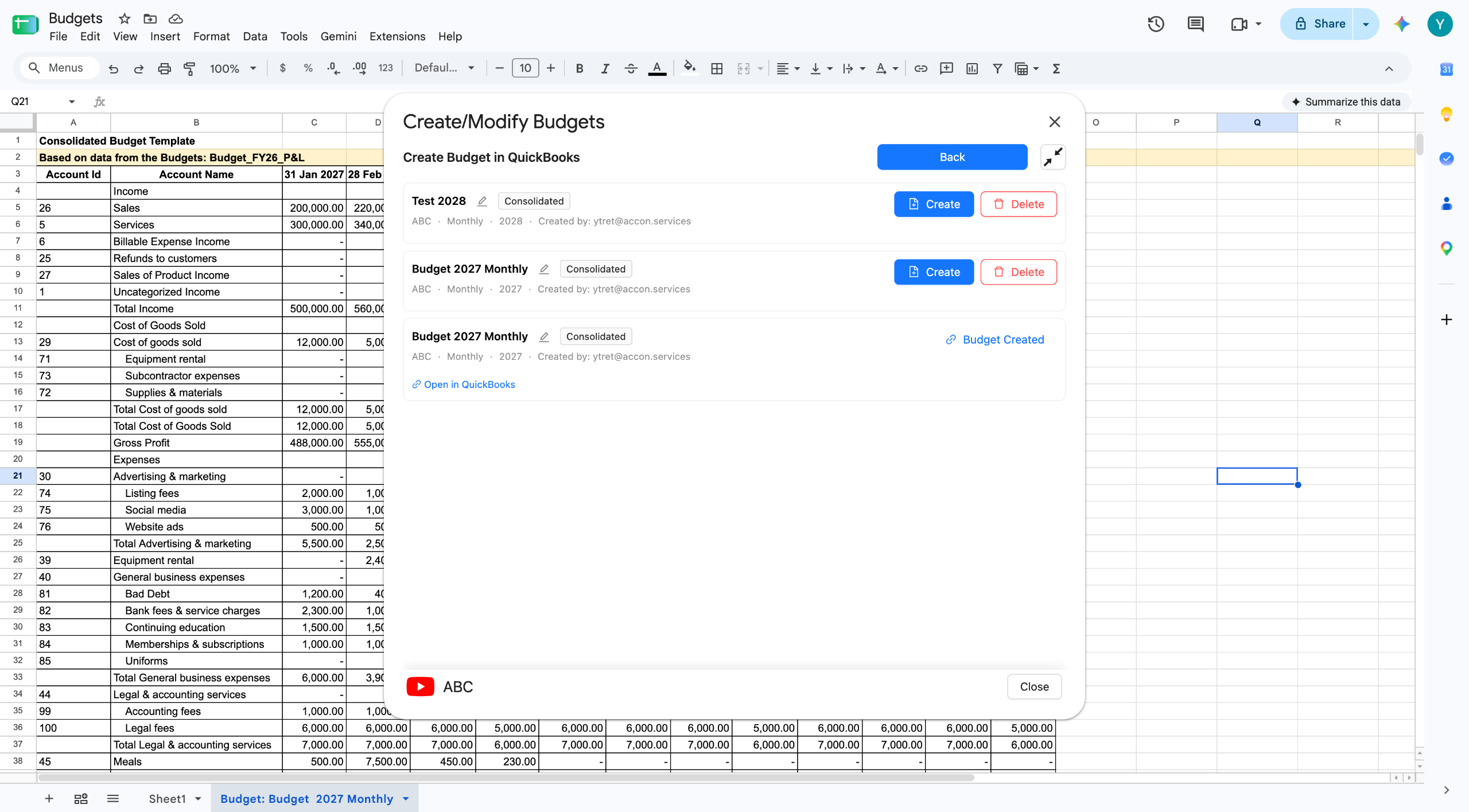
For a new budget you get a list, with a pencil icon next to each name. Rename it there if you want, then click Create.
Rename the budget if you need to, then upload it with Create.
Once it uploads, the row says Budget Created and an Open in QuickBooks link appears. Click it. Check the numbers landed where you expected.
The budget inside QuickBooks, with monthly columns and totals, straight from the sheet.
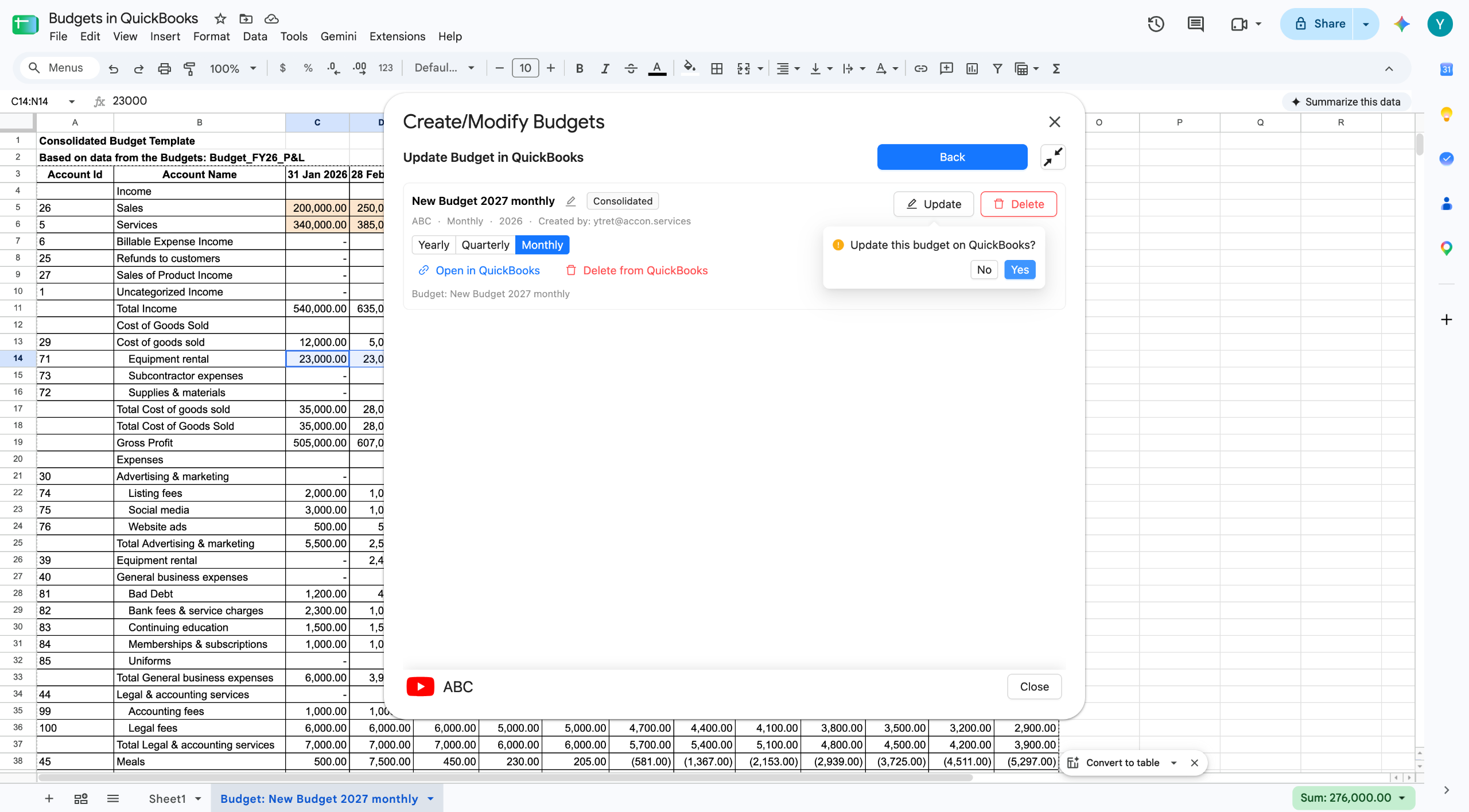
Updating works the same way. Select the budget, click Update, and confirm. That screen also has a Yearly, Quarterly, and Monthly toggle, so you control how the figures go up.
Select the budget, click Update, and confirm the change.
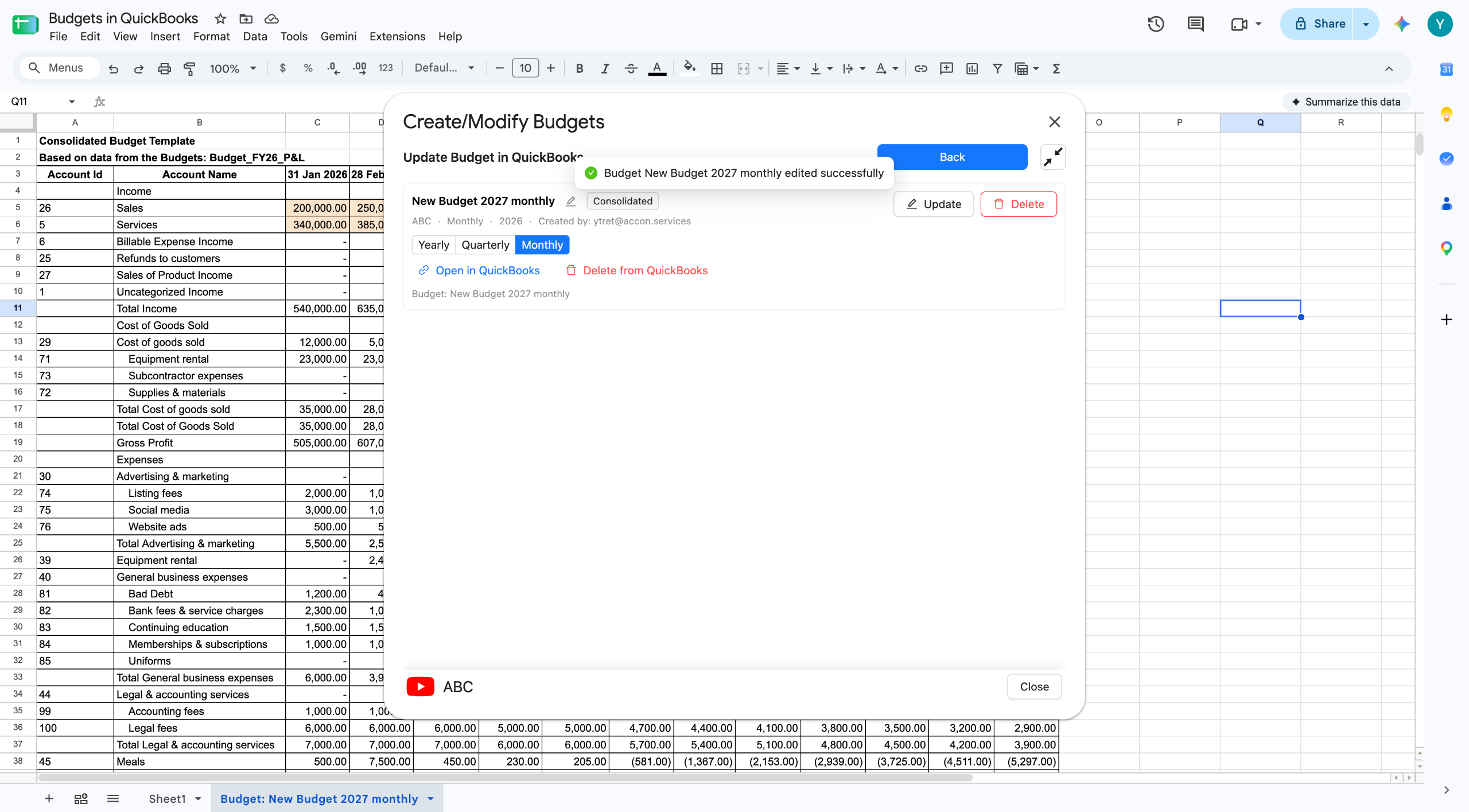
A confirmation appears when it is done. The Open in QuickBooks link lets you check the change right away. Always check. It only takes a moment, and it is the difference between a budget you trust and one you hope is right.
You can rename a budget before uploading it. That means you can keep versions side by side in QuickBooks. Upload the approved plan, then upload a revised copy under a clearer name. You can report against either one.
Subdividing Budgets by Class, Location, or Customer
This QuickBooks budgeting software isn't limited to one flat number. Switch Format from Consolidated to Subdivided on the setup screen, then choose whether to split by Class, Location, or Customer. You also pick exactly which ones to include, rather than taking all of them.
Say you split by Customer. Tick the customers you want, then click Generate Budget Templates. G-Accon builds a separate template in Google Sheets for each customer you selected, not one sheet with everything crammed in. You fill in the figures for each one.
Uploading is the same as before. Open Create Budget in QuickBooks and click Create for the budget you want. Once it is done, you can open QuickBooks and check every customer budget landed.
Why subdivided budgets matter for multi-entity accounting
One company-wide number is not much use to a business with four sites. The manager of site three cannot act on a total that includes the other three. Subdivide by Location and each site gets its own targets. The group total still adds up.
The same goes for Class with service lines, and Customer with contract work. If you already split your profit and loss that way, budget the same way. Then your budget versus actual reporting lines up on its own. One person can also prepare the lot in one workbook, instead of merging four spreadsheets by hand.
One tip before you start. Whatever you subdivide by needs to exist in QuickBooks first. If the locations are not set up there, set them up before you build the template, not after.
Consolidating Multiple Budgets in One Workbook
Combine budgets across years, classes, locations, and customers
This QuickBooks budgeting software also brings multiple budgets together. Budget Consolidation is the second item on the Budgets menu. It brings several budgets together into one view. They do not have to match. You can combine budgets from different years, and budgets built by class, location, or customer.
The steps are short. Go to Budgets, then Budget Consolidation. Tick the budgets you want to combine. Click Consolidate. G-Accon builds the combined budget in Google Sheets, where you can report on it, chart it, or send it to a client.
Combining across years is the one people miss. Put this year's budget next to last year's and next year's draft. The trend does the arguing for you. That is hard to do when each budget sits on its own QuickBooks screen.
Use case: managing several QuickBooks clients from one workbook
Picture budget season at a firm with a dozen QuickBooks clients. The old routine is one spreadsheet per client, a lot of copy and paste, and a week of typing approved numbers back into each company file.
The Budget Module changes the shape of that. Build each client's template from their own actuals. Do the work in one workbook. Upload each budget to the right company. When a client changes their mind in March, download, edit, update. QuickBooks then runs budget versus actual reporting against whichever version you sent.
Getting Started
Where to find the Budget Module in G-Accon for QuickBooks
Setting up this QuickBooks budgeting software takes just a few minutes. Install G-Accon for QuickBooks, connect your company, then go to Extensions, G-Accon for QuickBooks, Budgets. If you already use G-Accon for reporting, it is in the same menu as everything else. There is nothing extra to install.
Plans, company limits, and user seats are on the G-Accon pricing page. Every plan starts with a 14-day free trial, and you do not need a card.
Try the interactive demo
Reading about a workflow only gets you so far. We built a short interactive demo of the whole thing, from opening the menu to checking the budget in QuickBooks. You click through at your own pace, and nothing touches your real data.
Prefer it full screen? Open the Budget Module demo in a new tab. It runs through the same steps covered above, from the Extensions menu to checking the finished budget in QuickBooks.
FAQ
Does the Budget Module work with QuickBooks budgets I already created?
Yes. As QuickBooks budgeting software, it works with budgets you already built — use Download an Existing Budget and pick it from the dropdown. It comes into Google Sheets with its figures intact. Edit it there, then send it back with Update Budget in QuickBooks. You can also use an old budget to pre-fill a new one. That is the usual way to roll a budget forward a year.
Can I upload budgets for multiple classes or locations at once?
This QuickBooks budgeting software handles granular formats. Yes. Set the format to Subdivided and choose Class, Location, or Customer. You can build templates for just the ones you select rather than all of them. Then upload the subdivided budget and check it in QuickBooks.
Build Your Next Budget With G-Accon's QuickBooks Budgeting Software
Build it from last year's actuals. Edit it like any spreadsheet. Push it into QuickBooks once it is signed off. Start your 14-day free trial, no card needed.
G-Accon lives in Google Sheets and talks to Xero, QuickBooks Online, Sage, FreshBooks, and Xero Practice Manager. It pulls your numbers in, and it pushes them back out, so you can post journals and invoices in bulk without leaving the sheet. Consolidation and multi-currency are included with every plan, and a single plan can cover up to 250 companies.
Syft Analytics makes good-looking reports, but Xero bought it in 2024; it charges you for each entity, and it can't write anything back. If every client you have sits on Xero, you'll probably get on fine with it. If your client list is mixed, G-Accon handles the whole lot the same way.
G-Accon vs Syft Analytics: The Short Answer
Go with G-Accon if your clients aren't all on the same accounting platform and you want to build your own reports. Go with Syft if every client is on Xero and your team won't go near a spreadsheet.
The two come at the job from different angles. Syft is an app you log into. It reads your books and hands you charts and report packs. G-Accon is a set of Google Sheets add-ons. It drops your live numbers into a sheet you already know, and it can send data back the other way.
One thing to know before you look at features. Xero bought Syft in September 2024 for up to 70 million US dollars. Syft still runs as its own app and still works with QuickBooks Online. But it belongs to one of the two big platforms now. If half your clients are on QuickBooks, think that through first.
G-Accon isn't tied to anyone. It treats every platform the same, and firms give it 4.7 out of 5 on G2 across roughly 198 reviews.
Where G-Accon Is Built Differently
Works across Xero and QuickBooks with a finance reporting workflow
G-Accon plugs into five platforms, so your team learns one way of working and uses it on every client. Xero, QuickBooks Online, Sage, FreshBooks, and Xero Practice Manager all behave the same inside Sheets. No hopping between apps depending on whose file you've opened. And when someone new joins, you teach them once.
Here's the bigger thing. Most reporting tools only read your data, and Syft is one of them. G-Accon reads and writes. From a sheet you can add, change, or delete invoices, journals, payments, bank lines, and contacts in bulk, then post the batch into Xero or QuickBooks.
That changes what the tool is good for. A read-only app can show you the accrual you forgot. It can't post it. With G-Accon, the sheet where you spot the problem is the sheet you fix it from. No export, no re-typing, no checking your own typing after.
Group work is in the box from day one, not parked behind a bigger plan. Consolidation, intercompany eliminations, and live rates for 170 plus currencies come with every plan. G-Accon also pulls companies together from different platforms. A group with one entity on Xero and another on QuickBooks lands in one sheet.
Spreadsheet-native FP&A and reporting workflows without adding another reporting silo
G-Accon runs inside Google Sheets, so there's no new app to learn, no extra login, and no second system to keep in step. Your workings, your models, and your client reports sit in one place.
It also means nobody else's layout boxes you in. That's the gripe you hear most about ready-made report packs. Once the report is built, there's barely any room to change it. In a sheet, every cell is yours. Move a heading, drop in a column, throw it out and start again.
In practice it goes like this. You build a report once, from scratch or from one of the 100 plus templates. You set it to refresh on a schedule. You add an alert, maybe for overdue invoices. You tell it to email the finished thing to your client. Then you leave it alone and it keeps going.
All of this is really about how fast you close. APQC asked 2,300 firms how long their monthly close takes. The middle of the pack needs 6.4 days. The best quarter are done in 4.8 days or less. The slowest need 10 or more. Reports and re-typing numbers by hand is where those days go.
On security, G-Accon holds a SOC 2 Type 2 attestation covering all five trust services criteria, checked by an outside auditor, plus a GDPR attestation.
Here's how the two stack up on the things firms ask about most.
Syft is good at handing you a finished report pack you didn't have to build. You hook up a client, pick a report, and you've got something to send. Users like the templates and the charts, and you can see why.
It also does things G-Accon doesn't, and it'd be silly to pretend otherwise. Syft gives you industry benchmarks, business valuations, and long-range forecasts. Its Syft Assist add-on uses AI to flag numbers that look odd. If showing a client how they compare to similar businesses is part of your pitch, that alone is worth a look.
Two catches. Multi-currency doesn't kick in until the Plus plan, so one small group with an overseas subsidiary can push you up a tier. And Syft only reads your books, so anything you spot, you still fix by hand.
Now built into select Xero plans
Since Xero took over, a cut-down version called "Analytics powered by Syft" comes inside some Xero plans. In the UK that's Comprehensive and Ultimate. In the US, Xero's partner offer covers Growing and Established. Xero switched it on worldwide in January 2026.
So there are two Syfts about now. The one inside Xero is lighter, for owners who just want a quick look at their numbers. The full app has the deeper stuff. Which you get depends on your client's plan and whether you're a Xero partner.
That's the deal with anything bundled. It's cheap to start, and it can change without anyone asking you. Xero has put plan prices up twice in the past year and shuffled what sits in each tier by country. A tool you picked yourself doesn't shift when your client's ledger provider rewrites its price list. It also doesn't stop at your Xero clients.
Which One Fits Your Firm
It comes down to one question. Is every client of yours on Xero, or not? Cost follows from that, because the two count in different ways. G-Accon charges per platform, and each plan covers a block of companies. Syft charges for each entity you connect.
The gap widens the more clients you take on. Say you look after 25 companies. On the Accountant plan that's 150 dollars a month, so about 6 dollars a company. Enterprise covers 250 companies for 450 a month with unlimited users, under 2 dollars each. Paying per entity doesn't bend like that. Every client you win adds a line to the bill.
Pricing
G-Accon
Syft Analytics
How it is charged
Per platform, per month
Per entity, per month
Entry plan
Business, 60 a month or 50 billed yearly. 3 companies
Basic is free. Standard is the first paid tier
Mid plans
Accountant, 150 a month, 25 companies. Advisor, 300 a month, 50 companies
Plus and Advanced, priced per entity
Top plan
Enterprise, 450 a month or 375 yearly. 250 companies, unlimited users
Unlimited entity plans offered
Consolidation included
Every plan
Plus plan and up
Free trial
14 days, no card
14 days, plus free Basic tier
All figures in US dollars. G-Accon's full pricing is on the pricing page. Syft charges per entity and prices move with billing term, so check them at signup before you budget.
Choose G-Accon if…
Your clients sit on more than one platform and you want one way of working for all of them.
You need to push data back into the ledger, not just pull reports out.
You want to lay reports out your own way instead of living with someone else's format.
You look after groups and don't want to pay more for consolidation and live currency rates.
You're taking on clients and would rather not pay again for each one.
You'd rather your reporting didn't run on a tool owned by your clients' ledger provider.
Choose Syft (or Xero's built-in Analytics) if…
Every client you have is on Xero, and you can't see that changing.
Benchmarks and valuations are a big part of what you sell.
You only ever need to read and present numbers, never post them.
Your team won't work in a spreadsheet, and that's that.
Not many firms stay on one platform for long. Every client you win on QuickBooks, every group with a subsidiary on Sage, is one more thing a Xero-first tool can't reach. G-Accon was built for a mixed client list. Try it free for 14 days, no card.
FAQ
Can G-Accon send data back into my accounting system?
Yes, and it's the biggest split between the two. From a sheet, G-Accon can add, change, and delete invoices, journals, payments, bank lines, and contacts in bulk, then post them into Xero or QuickBooks. Syft reads your data but can't write back.
Does G-Accon work with QuickBooks as well as Xero?
It does. G-Accon links Google Sheets to QuickBooks Online, Xero, Sage, FreshBooks, and Xero Practice Manager, with two way sync on all of them. Each platform is its own plan, and each plan covers a block of companies.
Which one is better for multi-entity consolidation?
G-Accon, for two reasons. Consolidation and live currency rates come with every plan, so you're not paying up a tier for them. And it pulls together companies from different platforms, so a group with one entity on Xero and another on QuickBooks lands in one sheet. With Syft, multi-currency starts at Plus.
Is Syft Analytics still its own product after the Xero deal?
For now, yes. Xero says Syft will keep running as its own app whatever accounting software you use, and it still works with QuickBooks Online. Just remember who decides what happens to it next.
Do I get Syft free with Xero?
Sometimes. A cut-down version comes with some Xero plans, like Comprehensive and above in the UK. Xero partners can get the full app when clients are on qualifying plans, which in the US means Growing and Established. Otherwise you pay per entity, and what you get depends on your client's plan and country.
Is G-Accon safe enough for client data?
Yes. G-Accon holds a SOC 2 Type 2 attestation covering all five trust services criteria, checked by an outside auditor, plus a GDPR attestation. Your data stays in your own Sheets and your own accounting platform.
G-Accon vs Joiin: Consolidated Reporting Compared
“
TL;DR
In this G-Accon vs Joiin comparison: both tools add up a group properly, but the difference is what you can do next. G-Accon works inside Google Sheets and writes back to your ledger. Spot a coding error in the group P&L and you can fix it and post it from the same sheet.
You also get every reporting feature on every plan. Eliminations, account mapping, and live rates for over 170 currencies. Joiin is a good, focused consolidation app with unlimited users on all plans. But it only reads your books, and its cheapest tier reports in one currency.
Pick G-Accon if you want to pull the group together and then act on what you find. Pick Joiin if a set of group reports is all you need, and nothing has to happen after that.
Joiin is a real specialist. Group consolidation is its whole product, and it's good at it. Both tools sit at 4.7 out of 5 on G2. So this isn't about which one adds up columns correctly. Both do.
It's about what the report is for. If the report is the finish line, an app that makes reports is enough. If it's where the real work starts, you need something that can change the data too.
Where G-Accon Is Built Differently
Automation beyond consolidation
G-Accon reads your books and writes back to them. Joiin only reads. That one thing changes the whole job.
Picture a normal Tuesday. You're checking a group P&L. Three entities have put the same cost in three different accounts. With a read-only app you note it down, open each ledger, and fix them one by one. With G-Accon you fix it in the sheet and push it back. It can add, change, and delete invoices, journals, payments, bank lines, and contacts in bulk, straight into Xero or QuickBooks.
That's a whole step gone from month end. No list of fixes to work through later, and no second pass to check your typing.
The rest of the automation works the same way. Set reports to refresh on a schedule. Add alerts for overdue invoices. Have finished reports emailed out without you touching them. The Plus add-on costs 30 percent on top of any plan and links G-Accon to Zapier, Make, n8n, and Apps Script.
And because it runs in Google Sheets, the group numbers sit next to your workings in one file. Budget against actuals. Scenario work. A client dashboard. You build it once, your way, and every cell is yours to change. We've covered the other multi-entity reporting options too.
No per-entity pricing ceiling to plan around
G-Accon plans cover a block of companies, so your bill sits still while you grow. The Accountant plan covers up to 25 companies. Run 12 or 25, you pay the same. Win a client in March and nothing changes. Joiin prices by how many companies you add, so its bill follows your client list up.
For a franchise group or a growing firm, that matters more than it sounds. You budget once and stop thinking about it. Nobody checks the price list before onboarding the next site.
The reporting isn't held back by tier either, and this is the part worth checking closely. Eliminations, account mapping, and live rates for over 170 currencies are on every G-Accon plan, including the cheapest. With Joiin, multi-currency reporting starts on the Pro tier. Its Core tier reports in a single currency. So if you have one overseas subsidiary, the entry price isn't your price.
G-Accon also brings companies together across platforms. A group with one entity on Xero and another on QuickBooks lands in one sheet, in one currency, with intercompany entries stripped out.
On security, G-Accon publishes a SOC 2 Type 2 attestation covering all five trust services criteria, checked by an outside auditor, plus a GDPR attestation. Joiin's security page lists AWS hosting, SSL, and two-factor login.
Here's the G-Accon vs Joiin pricing side by side.
What you need
G-Accon
Joiin
Write data back to the ledger
Yes. Bulk journals, invoices, payments, bank lines
No. Reports only
Multi-currency reporting
Every plan. 170 plus currencies, live rates
Pro and Max only. Core is one currency
Eliminations and account mapping
Every plan
Every plan
Bill as you add companies
Flat inside your plan, up to 250 companies
Rises with your company count
Where you work
Google Sheets. No new app
Its own app. Excel add-in on Pro and Max
Report layout control
Full. Every cell is yours
Custom layouts and branded packs
Automation and alerts
Scheduled refresh, alerts, auto emails, all plans
Scheduled report delivery. API and Zapier on Max
Consolidate across platforms
Yes
Yes
Users included
1 to 10 by plan. Unlimited on Enterprise
Unlimited on every plan
Security published
SOC 2 Type 2 and GDPR attestation
AWS hosting, SSL, two-factor login
What Joiin Does Well
Multi-entity, multi-currency consolidation
Joiin was built for group work from the start, and it shows. Eliminations and account mapping come on every plan. Five group reports are ready to go out of the box: profit and loss, balance sheet, cash flow, KPIs, and trial balance. Dashboards, branded report packs, and budgets sit on top.
The results people report are real. One software CEO on Capterra said their old spreadsheet and macro setup ate about three weeks a month. Joiin cut more than a week off that straight away, and once tailored the job took a few hours.
It connects to a long list of ledgers too, including MYOB, Pennylane, Zoho Books, and FreeAgent. If your clients use those smaller platforms, that's a fair reason to look at it.
Two things to test on your own group first. Multi-currency starts on Pro, so check which tier you actually need before you compare prices. And some reviewers have found Joiin's own exchange rates don't always match the rates already sitting in Xero, which is worth a look if you report across currencies. G-Accon pulls live rates for more than 170 currencies on every plan.
Unlimited users on every plan
Every Joiin plan comes with unlimited users, reports, and clients, right down to the cheapest one. For a big team, that's a genuine win, and it's worth saying so plainly.
G-Accon counts seats instead. One on Business, five on Accountant, ten on Advisor, then unlimited on Enterprise. Extra seats are 20 dollars a month. In most firms only a handful of people touch the group reports, so ten seats goes a long way. Need the whole practice in there? Enterprise covers it, plus 250 companies.
One more billing difference. Joiin charges once for any mix of platforms. G-Accon charges per platform, so clients on both Xero and QuickBooks means two plans. What you get for it is a full two-way link to each ledger, not a read-only feed.
G-Accon vs Joiin: Pricing Comparison
Compare like for like, or the numbers will mislead you. Joiin has three tiers, Core, Pro, and Max, and the price of each moves with your company count. The headline figures people quote are for the entry tier. That tier reports in one currency and has no forecasting, no Excel add-in, and no API. To match what G-Accon includes as standard, you're on Pro or Max, and those prices aren't listed per tier.
G-Accon works the other way round. Four plans per platform, every reporting feature on all of them, and every price published.
Pricing
G-Accon
Joiin
How it works
Per platform. Each plan covers a block of companies
Figures in US dollars, checked September 2026. Both charge more for rolling monthly billing. See the full G-Accon pricing page for company and seat limits. Confirm your Joiin figure on its own pricing calculator, since it depends on tier as well as company count.
Then there's the cost that never shows up on either invoice. APQC asked 2,300 firms how long a monthly close takes. The middle group needs 6.4 days. The best quarter finish in 4.8 or less. Two days of senior time a month is worth more than any gap between these two bills.
G-Accon vs Joiin: Which One Fits Your Firm
Choose G-Accon if…
Adding up the group is only half the job, and someone has to post the fixes.
You report across currencies and want live rates without moving up a tier.
Your team already works in Google Sheets and wants the group numbers in the same file.
You're growing, and you want your bill to sit still while you add clients.
You need to clean up data in bulk, not just read a report that shows the mess.
A published SOC 2 Type 2 attestation matters to your clients or your risk sign-off.
Choose Joiin if…
You mainly want group reports from a dedicated app. If posting corrections back becomes part of the job, that's where G-Accon comes in.
Your ledgers include MYOB, Pennylane, Zoho Books, or FreeAgent.
You have a big team and need every seat included from the cheapest plan. G-Accon goes unlimited on Enterprise.
Your team would rather use a dedicated app than a spreadsheet. If it's building from a blank sheet that puts them off, G-Accon's 100 plus templates are worth a look first.
That's the real test in any G-Accon vs Joiin decision. Both are free for 14 days with no card, so don't decide from a table. Run one real group through each and see which one you're still using in week two. You can start a G-Accon trial here.
However you weigh it, the G-Accon vs Joiin decision comes down to one thing: read-only group reports, or a tool that writes the fixes back too.
FAQ
What's the main difference between G-Accon and Joiin?
G-Accon works inside Google Sheets and syncs both ways, so you can push journals, invoices, and fixes back into Xero or QuickBooks. Joiin is its own app. It reads your books and builds group reports, but it can't write anything back.
How much does Joiin cost?
Joiin has three tiers, Core, Pro, and Max, and the price of each depends on how many companies you consolidate. Billed yearly it starts around 23 dollars a month for one company on Core, and rises from there. Above 100 companies the price is custom. Remember Core reports in a single currency, so check which tier fits before you compare it to anything.
Does Joiin handle multi-currency on every plan?
No. Joiin's Core tier reports in one currency, and multi-currency starts on Pro. Setting your own rates is a Max feature. G-Accon includes over 170 currencies with live rates on all four of its plans, so one overseas subsidiary doesn't push you up a tier.
Can either tool consolidate entities on different platforms?
Both can. A group with one company on Xero and another on QuickBooks can be reported as one set of numbers either way. With G-Accon each platform is its own plan, and each of those plans includes a full two-way connection rather than a read-only feed.
Which is better for a franchise with lots of small entities?
G-Accon, for two reasons. Its plans cover blocks of companies, up to 250 on Enterprise, so the bill holds steady as you add sites instead of climbing with each one. And franchise groups tend to have coding drift between locations. Reading a report that shows it is one thing. Fixing it in bulk and posting it back is another, and that's the part that cuts the work.
Do I need to be good with spreadsheets to use G-Accon?
Not to get started. There are over 100 ready-made templates, so you're never staring at a blank sheet. The flexibility comes from Google Sheets, so the more comfortable you are with formulas, the further you can take it. Most teams already know Sheets, which is the point.
What Platinum Intuit App Partner Status Means for Your QuickBooks Data
Most accounting tools say they "integrate with QuickBooks." Platinum Intuit App Partner status is what that claim actually has to earn, and only a small group of QuickBooks tools have reached it.
What Is Intuit's App Partner Program?
Intuit runs a partner program for apps that connect to QuickBooks, and any app that wants deep, ongoing access to that data has to join it. The program sorts partners into four tiers: Builder, Silver, Gold, and Platinum.
Builder is the free, starting tier, and every new developer begins there. Platinum sits at the top, reserved for the apps Intuit trusts most with customer data. Intuit's own announcement of the program lays out the full tier structure, if you want to see it for yourself.
This matters when you're comparing QuickBooks tools, because a company that simply says it "works with QuickBooks" isn't making the same claim as a Platinum Intuit App Partner. One is a feature. The other is a credential that Intuit checks, and keeps rechecking.
G-Accon holds Platinum Intuit App Partner status, which makes it one of the few tools in the QuickBooks integration space to clear that bar, rather than just building a basic connection and calling it done.
What Platinum Intuit App Partner Status Actually Requires
Platinum Intuit App Partner status isn't handed out for signing up early or for paying a fee. Intuit checks it against real, measurable numbers.
A large, active user base
To reach Platinum Intuit App Partner status, a partner needs at least 3,000 active connections. That means 3,000 separate QuickBooks Online or Intuit Enterprise Suite companies, each with a current subscription and a working login link to the app. This isn't a download count; it's proof that thousands of real businesses use the connection right now, and that it keeps working for them day to day.
A technical and compliance check
Platinum partners also have to keep a valid payment method on file and pass an assessment Intuit runs to check how the app handles data and how well it performs. Lower tiers get to skip some of these checks. Platinum doesn't.
A status you have to keep earning
Platinum Intuit App Partner status isn't a one-time badge, either. Intuit reviews it on a set schedule, and a partner can drop a tier if its active user count falls or if it simply stops meeting the bar. That ongoing check is what makes the credential mean something, since it reflects current performance rather than a good year from a while back.
What Platinum Intuit App Partner Status Means for the QuickBooks API Connection
Your tier changes what an app can actually do with the QuickBooks connection, not just how the badge looks on a website.
Builder-tier apps get a capped amount of API access each month, around 500,000 credits, and once that cap is hit, calls simply stop working. Platinum partners get a much bigger allowance, around 75 million monthly credits, plus the lowest rate for any extra calls beyond that. In plain terms, a Platinum app is far less likely to hit a wall and stop syncing your data, even during a busy month.
Platinum partners also get early access to new QuickBooks features before everyone else, along with faster, more direct help from Intuit's technical teams when something breaks. For an accountant, that adds up to fewer sync failures, quicker fixes when QuickBooks changes something, and new features showing up sooner rather than months later.
What This Means When You're Evaluating QuickBooks Tools
When you're comparing tools that connect to QuickBooks, it's worth checking which ones hold real Platinum Intuit App Partner status, and at what tier.
Plenty of QuickBooks-adjacent tools sit at the Builder tier, or aren't part of the program at all, and that doesn't automatically make them unreliable. It does mean their connection hasn't faced the same active-user and technical checks that Platinum requires, though. LiveFlow, for example, connects QuickBooks data into Google Sheets for reporting, and its public materials describe that read-only sync without mentioning an Intuit partner tier.
G-Accon's pricing starts at $60 a month, with a 14-day free trial and no credit card needed to try it. That's a fairly small monthly cost for a tool that has passed Intuit's highest bar for QuickBooks reliability, and it comes with two-way sync and multi-entity consolidation built in.
Platinum Intuit App Partner Status and Data Security
Platinum Intuit App Partner status and independent security certification are two different things, so it helps to keep them separate.
Platinum tells you that Intuit reviewed how an app connects to QuickBooks and confirmed it meets the program's technical and usage standards. It's Intuit vouching for the integration itself, nothing more.
G-Accon also holds a separate SOC 2 Type 2 attestation, checked by an independent auditor, Sensiba LLP. It covers security, uptime, data accuracy, and privacy.
The difference between a Type 1 and a Type 2 audit is simple: Type 1 checks whether the right controls exist on one given day, while Type 2 checks whether those controls were actually followed, month after month.
G-Accon's audit ran for three months before the report was issued, and the company also holds a GDPR attestation covering how it handles data across the US, the EU, and other regions.
Put together, that gives you two separate checks pointing the same way, one from Intuit on the integration, and one from an outside auditor on security practices over time.
FAQ
What is Intuit's App Partner Program?
It's Intuit's official program for outside apps that connect to QuickBooks. It sorts partners into four tiers, Builder, Silver, Gold, and Platinum, based on things like active user numbers and how well the app meets Intuit's technical rules.
What is the difference between Platinum and other Intuit partner tiers?
Platinum is the highest tier, and the hardest to reach, since it needs at least 3,000 active QuickBooks connections, a completed technical check, and ongoing reviews. Lower tiers like Builder and Silver have lighter rules, and some skip the active-user requirement altogether, which is also why they come with a smaller API allowance.
Does Platinum status mean G-Accon is endorsed by Intuit?
No, and this point matters. Intuit is clear that being a partner isn't the same as an endorsement, even at the Platinum tier. Intuit's own materials for its top app partners say plainly that Intuit "does not endorse or approve" the products of the companies in its partner program, even while describing those apps as vetted and widely used. Platinum status simply means G-Accon met Intuit's technical and usage bar, not that Intuit is picking G-Accon over any other product.
How does Platinum Intuit App Partner status affect the QuickBooks API connection?
Platinum partners get a much bigger monthly API allowance than lower tiers, plus the lowest rate for extra calls and early access to new QuickBooks features before those go public. In practice, that means a lower chance of the connection breaking under heavy use, and faster access to new tools as they roll out.
Does Platinum status mean my data is more secure with G-Accon?
Platinum Intuit App Partner status shows G-Accon passed Intuit's review of its technical setup and usage standards, which covers how G-Accon connects to your QuickBooks data. That's a separate thing from an outside security audit, though. G-Accon backs it up with its own SOC 2 Type 2 attestation and a GDPR attestation, so you're not relying on the Intuit partnership alone for that assurance.
Key Takeaways
Platinum Intuit App Partner status is the top of four tiers in Intuit's App Partner Program. It requires at least 3,000 active QuickBooks connections plus a technical and compliance check, not just a listing in an app store.
Intuit reviews Platinum status on an ongoing basis, so it reflects a partner's current performance rather than a badge earned once and kept forever.
Platinum unlocks a much bigger QuickBooks API allowance, lower overage costs, and earlier access to new features, which for you shows up as a steadier, more reliable sync.
Platinum isn't an Intuit endorsement, and it doesn't replace independent security certification. G-Accon holds both the Platinum tier and a separate SOC 2 Type 2 attestation, and the two cover different things.
If you'd rather see what a Platinum-level QuickBooks connection looks like than just read about it, G-Accon's quickstart guide walks through setup step by step.
G-Accon Has Been Named a Finalist in the Xero Global App Awards 2026
G-Accon has been named a finalist in the Xero Global App Awards 2026, shortlisted in the Practice App of the Year category in two regions: Canada and Asia. Xero announced finalists on August 14, 2026, selecting G-Accon from a competitive field of Xero App Store apps for its role in helping accounting and bookkeeping practices automate reporting and data management.
About the Xero Global App Awards
The Xero Global App Awards are Xero's annual recognition program for apps on the Xero App Store, judged on the impact they deliver to small businesses and the practices that serve them.
The 2026 program ran submissions from April 20 through July 10, spanned nine regions (Global, Australia, the UK, the US, New Zealand, Canada, South Africa, Asia, and Ireland), and covered six categories: Practice App of the Year, Small Business App of the Year, Innovation App of the Year, Emerging App of the Year, Development Partner of the Year, and the community-voted People's Choice Award.
Eligibility was deliberately narrow. An app had to be actively listed on the Xero App Store, with Xero's own apps and bank feed integrations excluded from entry, and it needed at least five user reviews averaging three stars or better before it could even be submitted.
Developers filed a single entry per app but could tailor that entry across multiple categories and regions at once, which is why the same app name can turn up more than once across different regional shortlists. Xero named finalists first, on August 14, and confirmed category winners in a separate announcement roughly two weeks later.
Why Practice App of the Year, in two regions
Practice App of the Year recognizes apps that streamline how accounting and bookkeeping firms run day to day, as distinct from tools built for small-business end users or newer entrants still building a track record.
G-Accon made the shortlist in both Canada and Asia, a result that reflects how directly its core function fits the category: replacing manual Xero-to-spreadsheet exports with automated, live reporting, backed by a 4.81-out-of-5 rating across 208 Xero App Store reviews.
What makes the two-region placement notable is that Canada and Asia are not similar markets. Firm sizes, client mixes, and reporting conventions differ significantly between them, and Xero's regional judging panels evaluate submissions independently rather than applying one global standard.
Being shortlisted in both suggests the underlying problem G-Accon solves, getting live Xero data into usable, automated reports without a person rebuilding it by hand every reporting cycle, holds up across genuinely different accounting environments, not just one home market.
What G-Accon does
G-Accon is a Google Sheets add-on that connects directly to Xero (and, on other product lines, QuickBooks, Sage, and FreshBooks) to automate financial reporting and data sync for accountants and finance teams. Instead of exporting and reformatting reports by hand for every client, firms set up G-Accon once and let data flow automatically in both directions.
Two-way sync between multiple Xero organizations and Google Sheets, so updates made in either system stay current in the other without a manual export
Multi-entity consolidation with automatic intercompany eliminations, built for firms managing several client entities or subsidiaries under one parent structure
100+ pre-built report templates, plus a drag-and-drop builder for firms that want to standardize their own reporting format across every client
Live dashboards for tracking business or client metrics in real time, rather than waiting on the next manual data pull
Scheduled, automated report emails and alerts, so recurring client or management reports go out on their own
Multi-currency handling for firms managing clients or entities outside their home country
White-labeled report formatting for anything that goes in front of a client under the firm's own branding
G-Accon has been listed on the Xero App Store since 2018, filed under Reporting and Forecasting and Accountant Tools, and offers a 14-day free trial with no credit card required. Paid plans are structured across four tiers, Business, Accountant, Advisor, and Enterprise, with an optional Plus add-on available on any tier for teams that need deeper automation.
Why G-Accon’s Xero Global App Awards 2026 Finalist Recognition Matters
Making the finalist list still means Xero's judges narrowed the full field of eligible entries in each region down to a short handful of names, and G-Accon was one of them, in two regions rather than one.
Getting there required clearing a real bar: five-star-scale user reviews strong enough to qualify for entry in the first place, then a judged evaluation against every other eligible Practice App of the Year submission in that region. G-Accon congratulates everyone recognized this year, in every category and region.
What it means for firms using G-Accon
For current customers, this isn't news that changes day-to-day workflow so much as external validation: Xero, the platform G-Accon plugs into, effectively confirmed that the reporting and consolidation problems G-Accon solves are significant enough to be judged and recognized in its own award program. It's also a reasonable prompt to check whether your team is using the full feature set.
A lot of firms adopt G-Accon initially just for basic Xero-to-Sheets reporting and don't get around to trying multi-entity consolidation, scheduled report delivery, or white-labeled client reporting until much later.
For firms evaluating reporting tools and encountering G-Accon for the first time because of this recognition, a two-region finalist placement is a reasonable data point to weigh alongside the existing App Store rating and reviews you'd already be checking.
The 14-day free trial makes that comparison low-risk to run directly against whatever spreadsheet workflow, or competing tool, your firm uses today.
In G-Accon's own words
"Being named a finalist in two regions at this year's Xero Global App Awards means a great deal to our team. Our mission has always been to help accountants, advisors, and finance professionals get more out of Xero and Google Sheets, and this recognition reflects the trust our community has placed in us. We're proud to be counted among such an innovative group of Xero app partners."
— CEO, G-Accon
Frequently asked questions
Did G-Accon win its category?
No. G-Accon was a finalist in both Canada and Asia Practice App of the Year categories, though it was not the category winner in either region.
How is G-Accon rated on the Xero App Store?
4.81 out of 5 stars from 208 reviews, as of this writing.
Does G-Accon offer a free trial?
Yes. G-Accon offers a 14-day free trial with no credit card required, across its Business, Accountant, Advisor, and Enterprise plans.
Does G-Accon work with accounting software other than Xero?
Yes. Alongside Xero, G-Accon also connects to QuickBooks, Sage, and FreshBooks, depending on the product line.
About G-Accon
G-Accon is a Google Sheets add-on platform that helps accountants and finance teams automate financial reporting and data synchronization with accounting software including Xero, QuickBooks, Sage, and FreshBooks. It offers real-time two-way data sync, customizable report templates, and multi-entity consolidation, cutting down the manual reporting work that eats into a firm's billable time. Learn more at g-accon.com.
Upgrading FP&A in Google Sheets doesn't mean tearing out the model you've spent years building. Keep your tabs, your formulas, and your dashboards. The only thing that needs to change is how the numbers get in front of you.
That's what G-Accon does: it pulls QuickBooks and Xero data straight into the Google Sheets you already use, so reporting and automation just run in the background. When you're ready to look forward instead of back, G-CashFlow, a separate product, picks up the forecasting and what-if work.
TL;DR
Your spreadsheet isn't the problem, so if you're upgrading FP&A in Google Sheets, there's no need to throw it out. G-Accon pulls live QuickBooks, Xero, or FreshBooks data into the Google Sheets model you already use. It automates the refreshes too, so you stop copying and pasting numbers every month. Once you're ready to forecast or run what-if scenarios, that job belongs to a separate tool called G-CashFlow, built just for that.
What to Keep When You Upgrade FP&A in Google Sheets
Maybe your firm's spent years building out reporting or planning in Google Sheets. That work counts for something. The formulas, the tabs, the client-specific logic, and the dashboards your team already knows how to read don't have to go away. A clunky process around them isn't a reason to rebuild the whole thing.
Most of the pain in a spreadsheet-based FP&A setup doesn't come from the spreadsheet itself. It comes from how the numbers get into it. Someone exports a report from QuickBooks or Xero, cleans it up by hand, and pastes it into the right tab.
Then they do it again the next month, and the month after that. That's a data problem, not a modeling problem. And a data problem doesn't need a new platform to fix it.
So think about what's actually slowing your team down. If it's the model itself, that's one conversation. But if it's the hour someone loses every week pulling numbers and reformatting them, that's a much smaller fix. It's also the one this article walks through.
Picture the kind of setup a lot of firms already run. There's a raw data tab that gets refreshed by hand, formulas that pull from it into a summary tab, and a dashboard built on top for the client or the partner meeting. That structure works fine.
The weak link is almost always the raw data tab, since it depends on someone remembering to update it. Fix that one link, and the rest of the model just keeps doing what it already does well.
Add Live Accounting Data and Reporting Automation with G-Accon
This is where core G-Accon comes in. It sits between your accounting platform and Google Sheets, so the data stays fresh and the manual export step goes away for good. Setup happens once, in the sheet you already have, and after that the connection just runs quietly in the background.
Connect QuickBooks or Xero data
G-Accon connects directly through QuickBooks integration and G-Accon for Xero. It pulls transactions, accounts, and reports straight into the sheet you already work in. It's a two-way connection too, so you can create or bulk-edit invoices, bank transactions, and contacts right from Sheets.
Then you push them back to your accounting platform without switching tabs. If your firm runs on FreshBooks instead, it connects the same way.
You don't need a specific plan tier just to make this work. G-Accon runs alongside whatever QuickBooks Online or Xero subscription you already pay for, so there's no upgrade to negotiate first.
It's also a Platinum Intuit Partner and Premium Xero Partner. On top of that, it holds SOC 2 Type II certification, which matters once a client asks how their financial data is being protected.
Automate refreshes, reporting, and recurring workflows
Once the connection is live, you can schedule automation and scheduled delivery hourly, daily, weekly, or monthly. Reports then update on their own instead of waiting on someone to remember.
You can set email alerts for when a refresh runs, and send finished reports out as PDF or Excel files to partners or clients on a set schedule. If you manage more than one entity, G-Accon can also consolidate data from multiple QuickBooks or Xero companies into a single report. That way, you're not stitching it together by hand either.
Keep formulas, templates, dashboards, and client-specific logic in Sheets
None of this touches the model itself. Your formulas stay exactly as you wrote them. Your dashboards keep the layout your team already knows. Any client-specific logic you built in over the years stays right where you left it.
G-Accon just keeps the numbers behind all of it current, so the work you already did keeps paying off instead of slowly going stale.
Where Forecasting and Scenario Planning Fit
Reporting tells you what already happened. At some point, though, you'll want to know what's coming next. That might mean whether cash will hold up through a slow quarter, or what happens if a client pays late. That's a different job from reporting, and it's where G-CashFlow takes over.
Use G-CashFlow for three-way forecasting
G-CashFlow is a newer addition to the G-Accon lineup, and it's built to do one job well: pull your actuals from QuickBooks or Xero and turn them into a three-way forecast that ties your profit and loss, balance sheet, and cash flow together.
That way, you're looking at where the business is actually headed, not just where it's been. It's a separate product from core G-Accon, built specifically for forecasting rather than reporting, so it doesn't get bundled in with the data and automation layer described above.
One thing worth knowing: forecasts are currently built one entity at a time, so if you're forecasting for several clients, you'll set each one up on its own.
Build and adjust what-if scenarios in Google Sheets
Once forecasting's set up, you can test assumptions right inside Sheets. Say you're planning to hire someone. You can drop their salary into a projected worksheet and watch it flow straight through to the cash flow and P&L.
Or you can take last year's actuals and bump revenue up by a percentage to see what a stronger quarter would look like, then build a separate "worst case" version next to it where collections slow down instead.
You can keep as many of these scenarios side by side as you want: basic, worst case, best case, whatever fits how your firm thinks about risk. It all lives in the same spreadsheet your team already knows, so there's no new interface to learn just to ask "what if."
How Core G-Accon and G-CashFlow Fit Together
It helps to think of these as two separate layers stacked on top of your existing model, rather than one product trying to do everything at once.
Interactive task breakdown
Tap any task to see what stays in Google Sheets and which product handles it. This version uses native WordPress-friendly HTML and does not rely on JavaScript.
Formulas, templates, and dashboards You ▾
Stays in your spreadsheetYes, untouched
Handled byYou
Pulling live QuickBooks, Xero, or FreshBooks data Core G-Accon ▾
Stays in your spreadsheetYes, feeds your existing sheet
Handled byCore G-Accon
Writing changes back to your accounting platform Core G-Accon ▾
Stays in your spreadsheetYes
Handled byCore G-Accon
Scheduling refreshes and report delivery Core G-Accon ▾
Stays in your spreadsheetYes
Handled byCore G-Accon
Consolidating multiple entities Core G-Accon ▾
Stays in your spreadsheetYes
Handled byCore G-Accon
Three-way forecasting G-CashFlow ▾
Stays in your spreadsheetYes
Handled byG-CashFlow
What-if scenario testing G-CashFlow ▾
Stays in your spreadsheetYes
Handled byG-CashFlow
Core G-Accon isn't trying to be your FP&A system, and it doesn't do three-way forecasting or scenario modeling on its own. It's the layer that keeps your existing model fed with accurate, current numbers.
G-CashFlow picks up from there once you need to look forward instead of back, and you can add it whenever that need actually shows up, not before.
You don't have to migrate anything to bring it in either. It connects to the same QuickBooks or Xero data and lives in the same spreadsheet environment, so there's nothing new to set up from scratch.
When This Spreadsheet-First Approach Fits, and When a Dedicated FP&A Platform May Fit Better
This spreadsheet-first way of upgrading FP&A in Google Sheets works well if your team already has a spreadsheet model that does what you need. It also fits when the real complaint is stale or manually-entered data, not the model itself.
That includes firms managing a handful of entities that want consolidated reporting without learning a brand new system from scratch. If that sounds like your setup, the fix is smaller than it might feel right now.
It fits less well once your reporting and planning needs outgrow what a spreadsheet can reasonably hold, even an automated one. Maybe you're consolidating dozens of entities in real time.
Maybe you're running budget cycles across several departments with built-in approval workflows. Or maybe you need planning features well beyond forecasting and scenario testing.
In any of those cases, a dedicated FP&A platform may be worth the switch. There's no shame in outgrowing a spreadsheet. It just means your firm has gotten bigger than the tool, and that's a good problem to have.
Do you Really Need a Dedicated FP&A Platform
The honest way to check which side you're on is to ask what would actually change if the data refreshed itself tomorrow. If the answer is that your reporting gets faster and your team gets an hour back every week, this is the right move.
If the answer involves five other systems, a dozen approval steps, or planning cycles no spreadsheet was ever going to hold anyway, that's a sign the conversation is bigger than a data layer.
It's also worth knowing what else is out there before you commit to any path. QuickBooks' own Spreadsheet Sync feature does something similar on paper.
But it only works inside Excel, not Google Sheets, and it's limited to QuickBooks Online Advanced. If your team is committed to Sheets, that rules it out right away. For a fuller breakdown of how the two compare, see this comparison rather than repeating the whole thing here.
FAQ
Can I keep my existing Google Sheets models when I connect G-Accon? +
Yes. G-Accon connects data into the sheet you already have, so there's no rebuild involved. Your formulas, formatting, and layout stay exactly as they are, and you decide where the new data lands.
What is the difference between core G-Accon and G-CashFlow? +
Core G-Accon handles accounting data. It connects to QuickBooks, Xero, Sage, or FreshBooks, syncs it both ways, automates refreshes, and consolidates multiple entities. G-CashFlow is a separate product built for three-way forecasting and what-if scenario planning instead, not for reporting on data you already have.
Does G-Accon work with Xero as well as QuickBooks? +
Yes, and with FreshBooks and Sage too. The connection works the same way no matter which accounting platform your firm or client uses, so switching between them doesn't mean learning a new setup.
When should I use G-CashFlow for forecasting or scenario planning? +
Once historical reporting stops being enough, and you need to see what's ahead, like cash runway, the impact of a new hire's salary, or what happens if a client starts paying late, G-CashFlow is built for exactly that. Core G-Accon can get your data current, but the forecasting and what-if modeling itself lives in G-CashFlow.
Google Sheets can now run as a live reporting layer for your firm, pulling data straight from QuickBooks, Xero, Sage, and FreshBooks instead of waiting on a manual export. That's the whole idea behind the accounting automation stack: your books stay exactly where they are, and your sheets stop being static.
TL;DR
What the stack is: Google Sheets working as a live reporting layer, connected directly to your accounting software instead of running on manual exports.
What tools are involved: G-Accon connects QuickBooks Online, Xero, Sage, and FreshBooks to Sheets, while your accounting platform stays the system of record.
What it enables: automated P&L and balance sheet reports, cash flow analysis, multi-entity consolidation, budget vs actuals, and two-way sync back into your books.
Who it's for: accountants and firms already working in QuickBooks, Xero, Sage, or FreshBooks who want their Google Sheets reporting to stay current without anyone touching an export button.
What it takes: no coding. You authenticate your accounting software, decide what data to pull, and build your reports in Sheets the way you already know how.
What "the Stack" Actually Means
If you've worked in a firm for more than a few years, you already know the routine. Someone exports a report out of QuickBooks or Xero, pastes it into a sheet, and fiddles with it until the formulas downstream still work.
Then they do the same thing next week. And the week after that. Nothing's wrong with the sheet itself. It's the getting-data-into-it part that eats the time, and it's why so many "reports" are already a few days stale by the time a client actually sees them.
The stack fixes that one problem. Google Sheets doesn't turn into your accounting system, and it was never meant to. Google describes Sheets as an online spreadsheet app for creating, formatting, analyzing, and collaborating on spreadsheet data. QuickBooks, Xero, Sage, or FreshBooks stays the source of truth for every transaction, balance, and journal entry your firm records.
What changes is how that data gets from your books into your sheet. Instead of a person doing it by hand, G-Accon handles it through a connection you set up once. Your chart of accounts, your P&L, your balance sheet, all of it flows into the templates you've already built, and it keeps flowing on whatever schedule you set.
That's really why "stack" is the right word here, not "tool." You've got three pieces working together: the accounting software holding the real data, G-Accon moving that data around, and the Google Sheet where you actually do the reporting and analysis your firm cares about.
Picture a five-person firm running twenty client books. Right now, someone on that team basically owns "export day," whatever day that ends up being, and every report the firm relies on is only as fresh as the last time that person got around to it.
Once the stack's in place, that job disappears. A partner opens a sheet on a Tuesday afternoon and it reflects what happened in the books that morning, not whatever was true the last time somebody remembered to hit refresh. Small change in mechanics. Big change in how much you can actually trust the number sitting in front of you.
The Four Connections That Make the Stack Work
Most firms aren't running one accounting platform across every client, so the stack has to bend to whichever one you're on. Here's how each connection actually behaves.
QuickBooks Online
G-Accon for QuickBooks reads straight out of QuickBooks Online, accounts, transactions, classes, reports, all of it. You authenticate your QuickBooks account once, pick what you want pulled into a given sheet, and it just stays connected from there.
QuickBooks tends to be the platform most firms building this setup start with, and it's usually the connection people use to test the whole approach before rolling it out further.
It's worth taking your time on that first connection, because it becomes the template you'll repeat for every other client on the platform. And once you've mapped one QuickBooks client's P&L into a sheet, mapping the next one is mostly copy-paste and pointing it at a different company file.
Xero
G-Accon for Xero works the same way for firms on Xero. You connect the Xero organization, pull in whatever data you need, and it refreshes on the schedule you pick. If your firm has a mix of QuickBooks and Xero clients, you're not managing two separate systems to make this happen. Both connections work the same way from your side of things.
Sage
G-Accon for Sage covers firms running on Sage, which shows up more than people expect once you start asking clients what they're actually on. Accounts, contacts, journals, transactions, and sales invoices pull into Sheets the same way they do for QuickBooks or Xero, and it includes the same two-way connection, so you can push exports, imports, or deletions back into Sage straight from the sheet instead of wrestling with a CSV file.
Having Sage in the mix matters more than it sounds like it should. Without it, a single Sage client means going right back to manual exports for that one book, even if everyone else on your roster is fully automated.
FreshBooks
G-Accon for FreshBooks rounds things out, and it matters more than you'd think for firms with smaller clients or ones running service businesses where FreshBooks is common.
Reports and invoicing data pull into Sheets the same way they do for QuickBooks, Xero, or Sage, so you're not stuck manually exporting just because one client happens to sit on a different platform than the rest of your book.
A lot of firms actually feel this the most. That one client on a different platform used to mean a separate, manual process just for them. Now that client's reporting just fits into the same workflow as everyone else's, instead of turning into the exception the team has to remember every month.
What You Can Actually Do Once the Data's Live
Getting the data connected is step one. What you build on top of it is where the stack actually earns its keep.
Automated Reports
Once G-Accon's pulling data into a sheet, your P&L and balance sheet stop being something you rebuild from scratch every period. You set up the template once, hook it into G-Accon automation, and it updates on a schedule, daily, weekly, monthly, whatever fits your close.
Same story for any financial reports you already run regularly. You're not redoing the report each time. You're just opening a sheet that already has today's numbers in it.
For a firm handling monthly close across a full client list, this is usually where you feel the time savings first. Reports that used to eat a chunk of a Monday morning are just sitting there, done, because the schedule ran overnight. Whoever used to own that task gets that time back for actual analysis instead of data entry.
Cash Flow Analysis
Since transactions and balances stay live in the sheet, cash flow forecasting gets a lot more useful. You're working off what actually happened last week, not a snapshot from whenever someone last remembered to export.
That matters most for the question clients ask nearly every month: what does our cash on hand look like a few weeks out, and what happens if a big payment slips.
A forecast built on stale numbers is really just a guess wearing a nicer outfit. One built on data that updated this morning is something you can actually stand behind in a client meeting, and it holds up a lot better when someone pushes back on an assumption.
Multi-Entity Consolidation
Firms with several clients, or clients with more than one entity, hit the same wall over and over: getting one consolidated view means manually stitching together reports from separate sets of books.
Multi-entity consolidation through G-Accon pulls data from multiple QuickBooks or Xero companies into a single sheet, so a firm-level view updates the same way any single-client report does, on its own schedule, with nobody reassembling it by hand.
Doesn't matter if you're consolidating five entities under one holding company or comparing twenty unrelated clients side by side in a dashboard sheet, the mechanics work the same either way. Each entity's numbers land in their own space in the sheet, and the consolidated view just sits on top, pulling from all of them.
Budget vs Actuals
Budget vs actuals reporting only works if two things stay in sync: the budget you built and the actuals coming out of the books.
Once actuals are live, that comparison updates itself instead of someone having to refresh one side of the sheet and hope the other side hasn't drifted. Build the comparison once, and it keeps holding up period after period.
It's one of those reports that quietly breaks down under a manual process, too. The budget side barely changes, so nobody worries about it.
The actuals side is the one that goes stale, and usually nobody notices until a variance shows up that doesn't match what everyone already knows happened. A live connection just takes that failure point off the table.
Two-Way Sync
Everything so far moves in one direction, out of the accounting software and into Sheets. G-Accon also works the other way around. Build a journal entry or a budget line in a sheet, and you can push it back into QuickBooks, Xero, or Sage in bulk.
That matters a lot for firms that build budgets in spreadsheets in the first place, because spreadsheets are simply the easiest place to build them, and then need that work to actually land in the client's books instead of sitting in a sheet nobody else touches.
Without two-way sync, a budget in a sheet is basically just a reference document. Somebody still has to open the accounting platform and key it in themselves if it needs to live there too.
With two-way sync, the sheet stops being a copy of the work and turns into the place the work actually happens, with the accounting platform picking up the result on the other end.
Setting This Up Doesn't Require Code
None of this needs a developer, an IT ticket, or an API key you're stuck managing yourself. You authenticate your QuickBooks, Xero, Sage, or FreshBooks account inside G-Accon, pretty much the same way you'd log into any app with your existing credentials.
From there, you pick what data you want, accounts, transactions, specific reports, and where it should land in your sheet. You build the actual reporting and formulas the way you always have in Sheets. G-Accon's whole job is just making sure the raw numbers underneath stay current.
Honestly, the learning curve feels closer to setting up a new spreadsheet template than learning a whole new platform. If you already know your way around Google Sheets and your accounting software, you've already got most of what you need.
Most firms don't try to migrate their entire reporting suite on day one, and you shouldn't either. Get one report working for one client first. Confirm the numbers match what you'd expect, then extend the same setup to the balance sheet, the next client, and eventually the rest of your book. There's no reason to treat this as all-or-nothing.
Frequently Asked Questions
Can Google Sheets replace accounting software?+
No, and that's not what this stack is trying to do. QuickBooks, Xero, Sage, or FreshBooks stays the system of record for your transactions and books. Google Sheets is where you report on and dig into that data. They're not competing for the same job.
Which accounting software works with Google Sheets?+
Through G-Accon, QuickBooks Online, Xero, Sage, and FreshBooks all connect directly to Google Sheets. Each connection pulls live data on whatever schedule you set, and it works the same way no matter which platform your client happens to use.
Does this setup require coding?+
No. You authenticate your accounting software account, choose what data to pull, and build your reporting templates in Sheets yourself. There's no script to write and no API you have to babysit.
Can you consolidate multiple companies in Google Sheets?+
Yes. Multi-entity consolidation pulls data from more than one QuickBooks or Xero company into a single sheet, so firms managing several clients or entities get one consolidated view instead of piecing it together manually every period.
How does Google Sheets stay updated with live accounting data?+
Through scheduled refresh. Once a connection's set up, G-Accon pulls updated data into the sheet automatically on whatever interval you pick, daily, weekly, or monthly, so the numbers stay current without anyone exporting or pasting anything in by hand. You set the schedule once when you build the connection, and it just keeps running from there.
Key Takeaways and Where to Go Next
The Google Sheets accounting automation stack turns your existing spreadsheets into a live reporting layer instead of a static one, and it doesn't ask you to give up the templates and formulas you've already spent years building. QuickBooks, Xero, Sage, and FreshBooks stay the source of truth, G-Accon keeps the data moving between them, and you keep working in the tool you already know.
If you want to go deeper on any piece of this, here's where to start:
Eliminate the Month-End Export Loop Once and for All
The month-end export loop is the manual process of pulling a report from QuickBooks or Xero, exporting it as a CSV, and pasting it into Google Sheets by hand, then repeating that process for every client, every month.
Automating this connection removes the CSV step entirely, so accountants stop redoing the same manual work each month, without changing how clients keep their books.
Any accountant handling more than a handful of clients could describe the month-end export loop in their sleep. Log in. Pull the report. Export it as a CSV. Switch over to Google Sheets.
Paste the data in, then watch a column shift one row down, or a date format change without warning. Fix it. Reformat the headers the paste wiped out. Share the sheet, or email it, or upload it wherever the client checks for updates.
Close that tab, and the next client is waiting, whether they're on QuickBooks or Xero. The month-end export loop repeats with the same steps, different numbers, and different small errors to catch, every month, for every client, whether the firm has five clients or fifty.
The Cost of Manual Month-End Data Exports
Manual exports can easily take around 15 minutes per client once you account for logging in, pulling the report, exporting the file, pasting the data into Google Sheets, fixing formatting issues, and sending the finished report. For a firm with 20 clients, that means 20 separate export cycles each month before any billable analysis even begins.
The exact time will vary from one firm to another, but the cost becomes clearer when you look at what happens after the process is automated.
Michael King, a CFO, ran into exactly this before switching his team over to automated data pulls. As he puts it, what used to take 40 hours now takes just a few clicks.
Another G-Accon customer, the accounting and advisory firm Hot Toast, cut its own reporting time by more than half after making the same switch. Its team now closes some client accounts in a single day, a process that used to take a full week.
Those numbers will vary by firm. But the pattern holds. Manual exports don't just cost the 15 minutes spent doing them. They cost the hours a firm could be spending on client relationships, advisory work, or simply going home on time.
Why Accounting Firms Still Rely on Manual Data Exports
Firms keep doing manual exports not because it's the best method, but because rebuilding the process for every client at once feels like a bigger job than getting through one more month of exports.
Most firms aren't stuck in this loop because they think it's the right way to work. They're stuck because it's the way they've always done it.
The actual fix is smaller than it looks from the outside. Nobody has to retrain their team, rebuild their templates, or ask clients to switch accounting platforms.
What changes is one connection between the accounting file and the spreadsheet, set up once per client, plus a schedule that tells the sheet when to update itself.
How G-Accon Connects to QuickBooks and Xero
The real fix for the month-end export loop is a direct, one-time connection between the accounting platform and Google Sheets, not another export tool. Not every tool that promises to "automate your reporting" actually removes the export step, so it's worth being specific about how G-Accon does.
G-Accon connects directly to QuickBooks Online and Xero from inside Google Sheets, through an add-on installed from the Extensions menu. There's no CSV file involved at any point, ever. Once you connect a client's company file, that connection is a one-time setup. From then on, the data refreshes on its own, even when nobody is logged into the accounting platform at all.
This matters most for firms split across both platforms. If half a client list runs QuickBooks and the other half runs Xero, there's no need to learn two separate export routines or juggle two sets of instructions. The connection and the workflow behind it work the same way on either side.
It also matters because the reports themselves don't change; G-Accon pulls live numbers into the sheets, templates, and formulas already built. The layout the team knows and clients trust stays exactly the same. What changes is where the numbers come from, not the report itself.
How Automated Scheduled Sync Works in Google Sheets
G-Accon's scheduled workflows end the export loop by refreshing reports automatically on a set schedule, hourly, daily, weekly, or monthly, with no manual export step required.
Inside G-Accon's automation feature, a workflow gets a name, a short description, and a status of active or not active, then a report or template to refresh, something like a Profit and Loss statement, and a schedule to match.
Email recipients can be added right inside that same workflow, so a refreshed report lands in a client's inbox the moment it updates, with no extra step required.
Across 20 clients, that means setting up 20 schedules once instead of running 20 manual export cycles every single month. The sheets keep themselves current from then on. The work that used to repeat by hand every 30 days simply stops being work at all.
This is also the piece that sets G-Accon apart from a lot of other tools accountants try along the way. Plenty of reporting apps look great in a demo. Far fewer can sit quietly in the background, refresh themselves on a schedule, and hand a team a finished report without anyone touching an export button. That's the bar G-Accon is built to clear, month after month, client after client.
Dave Sellick, who spent years building his own automated month-end reporting system, landed on exactly this approach after trying other tools that didn't hold up: pulling live accounting data straight into the spreadsheets his team already used, instead of managing reports inside yet another separate app. G-Accon is one of the connectors he uses to make that pull happen.
How Scheduled Sync Improves Month-End Reporting
Once scheduled sync replaces manual exports, month-end reporting becomes instant: the numbers are already refreshed and waiting in the sheet. The morning after month end used to mean opening a dozen browser tabs and grinding through the export routine one client at a time. That morning now looks completely different, with figures already refreshed overnight or over the weekend, depending on the cadence chosen.
Say a client calls on a Tuesday afternoon asking how their cash position looks right now, not as of last month's close. Under the old process, that question meant a fresh export and a scramble to get it pasted in correctly before answering with any confidence. With scheduled sync in place, the sheet is already open with the number sitting there.
That's the real value of removing the export step. It's not just less work each month. It's the ability to answer client questions the moment they're asked, with numbers that can be trusted, instead of numbers that have to be rebuilt first.
How to Get Started With Automated Month-End Reporting
G-Accon costs $60 a month to start, includes a 14-day free trial, and is used by over 20,000 businesses, accounting firms, and CFOs worldwide.
Most firms connect one or two clients first, get comfortable with the schedule, then roll the same setup out across the rest of their list once they see how little upkeep it actually needs. G-Accon holds a 4.7 out of 5 rating across nearly 200 reviews on G2.
Security is worth a mention too, since this is client financial data moving through a cloud spreadsheet. G-Accon completed a SOC 2 Type 2 attestation, audited by an independent firm across its entire software system, covering all five trust categories: security, availability, processing integrity, confidentiality, and privacy. It also holds a GDPR attestation aligned with Article 5 of the regulation, relevant for firms with clients in the EU.
For a walkthrough of the setup itself, the quickstart guide covers connecting a first client and building a first scheduled workflow, start to finish.
Frequently Asked Questions
Does G-Accon replace my existing Google Sheets templates?
No, G-Accon does not replace existing Google Sheets templates. It pulls live data into the sheets already in use, so templates, formulas, and formatting stay exactly as they are. What changes is where the numbers come from and how often they refresh, not the sheet itself.
How often can G-Accon refresh data from QuickBooks?
G-Accon can refresh data from QuickBooks hourly, daily, weekly, or monthly, whatever fits each client. A client who gets reports once a month might only need a monthly pull, while a client monitored more closely can refresh daily, or even hourly, without extra effort.
What happens to my existing reports when I connect G-Accon?
Existing reports keep working as before. G-Accon connects to the sheet that already holds the report, points it at the right data in QuickBooks or Xero, and from then on that report pulls live numbers instead of numbers pasted in by hand.
Is G-Accon secure for client financial data?
Yes, G-Accon is built with client financial data security in mind. It holds a SOC 2 Type 2 attestation covering its full software system across all five trust categories, security, availability, processing integrity, confidentiality, and privacy, along with a GDPR attestation for firms working with EU-based clients.
How long does it take to set up scheduled sync?
Connecting a first client to scheduled sync usually takes a few minutes once logged into QuickBooks or Xero. Most firms have their first sync running the same day they start the trial.
Key Takeaways
The manual export loop, log in, export, paste, reformat, share, repeats for every client every month, and none of that time goes toward billable work. Automating that connection is how firms eliminate the month-end export loop for good.
A firm with 20 clients runs 20 separate export cycles a month just to get usable numbers in front of their team, and real G-Accon customers report reclaiming dozens of hours a month once that stops.
G-Accon connects QuickBooks Online and Xero directly to Google Sheets through a one-time setup, so there's no CSV file involved at any point afterward.
Scheduled workflows, set to refresh hourly, daily, weekly, or monthly, replace the manual export entirely. Build the schedule once, and the sheet keeps itself current from then on.
The firms that get the most out of this aren't just saving 15 minutes here and there. They're the ones who can answer a client's question the moment it's asked, because the numbers are already sitting there, refreshed and ready.
G-Accon vs Double: G-Accon gives accounting firms a broader way to manage their financial data. It connects multiple accounting platforms directly to Google Sheets, supports two-way sync and write-back, automates reporting, and consolidates multiple entities in one place.
Double focuses mainly on AI-powered close automation and practice management within the ledger. While some firms may use both, G-Accon covers more of the reporting, consolidation, and data-management work that continues throughout and after the month-end close.
If your firm is comparing G-Accon and Double, this guide shows where G-Accon offers the broader reporting, consolidation, and data-management workflow, where Double’s close automation fits, and how their pricing changes as your client list grows.
TL;DR
G-Accon is a Google Sheets add-on with two-way sync. It pulls live data from QuickBooks, Xero, Sage, FreshBooks, and Xero Practice Manager into spreadsheets, lets your team post journal entries and other accounting data back into the books, and consolidates multiple entities into one report.
Double is a practice-management platform built around AI-powered close automation, bank feed categorization, and AI-generated journal entries and accruals, plus a client portal, CRM, and tax tools.
G-Accon vs Double at a Glance
Category
G-Accon
Double
Best For
Reporting, data sync, and multi-entity consolidation in Sheets
AI-powered close automation within a broader practice-management platform
Platform
Google Sheets add-on
Standalone app with a client portal
Accounting Integrations
QuickBooks Online, Xero, Sage, FreshBooks, Xero Practice Manager
Once connected, your team can pull live financial data into a spreadsheet, build custom reports from more than 100 templates, and push changes, including journal entries, back into the accounting system when needed.
The feature that sets G-Accon apart is multi-entity consolidation. If your firm manages clients with more than one entity, or you need to roll up numbers across several companies into one report, G-Accon does that automatically, with support for currency conversion across more than 170 currencies and intercompany eliminations.
A report that used to take a full day of copying numbers between tabs can run in minutes once the sync is set up. Reports refresh on a schedule you set, so a partner opening a client's dashboard on Monday morning sees Friday's numbers, not last month's.
G-Accon is also an Intuit Platinum App Partner, which reflects the depth of its QuickBooks integration, and it holds the same Platinum tier with Xero.
What Does Double Do?
Double is a practice-management platform for accounting firms and bookkeepers, built around the idea of replacing several disconnected tools with one app. Its core module is AI-powered close automation: bank feed categorization, automated journal entry drafting, and accrual calculations that used to take hours by hand.
Beyond the close itself, Double bundles a branded client portal, a client database for tracking accounts, a tax suite with 1099 tracking, and receipt management. Instead of chasing spreadsheets, email threads, and a separate CRM every month, your team works from one dashboard that shows exactly which clients are done, which are stuck, and why, and handles some of the practice's other admin work along the way.
Each client gets their own close checklist, so nothing slips through the cracks when your team is juggling dozens of closes at once. The client portal also cuts down on the back-and-forth emails that usually eat up the last week of every month, since clients can log in and see status updates without asking your team directly.
If your firm wants AI-driven close automation bundled together with a client portal, CRM, and tax tools in one platform, Double is built for that combination.
It is worth noting that Double's deepest automation, accruals and AI journal entries, sits on its top Scale tier, so firms weighing the cost should factor in which features they actually need before picking a plan. For more on how firms benchmark their close speed, see this breakdown of how long month-end close should really take. For more on how firms benchmark their close speed, see this breakdown of how long month-end close should really take.
How G-Accon and Double Fit Into the Month-End Workflow
Here is the honest way to think about it: G-Accon takes what is inside your books and turns it into reports, dashboards, and consolidated statements your team and your clients can actually use. Double focuses on running the close itself, plus the practice-management work, client portal, CRM, tax, that surrounds it.
Neither tool tries to do the other's job. G-Accon does not manage close workflows, categorize bank feeds with AI, or offer a client portal. Double has no Google Sheets connection built in and no way to consolidate multiple entities into one view.
If your firm needs both jobs done well, you are looking at two tools working together, not one replacing the other.
Accounting System Integrations
Double's accounting-firm product syncs natively with two systems: QuickBooks Online and Xero. That covers a large share of the market, but it leaves out firms with clients on other platforms.
G-Accon covers more ground. It connects to QuickBooks Online, Xero, Sage, FreshBooks, and Xero Practice Manager. For firms that manage a mixed client base across several accounting platforms, that broader reach matters.
A firm running Double alongside clients on Sage or FreshBooks would need a separate solution for those files, since Double's accounting-firm product does not sync with either one.
This matters most for firms that grew through acquisition or serve clients in different industries. A bookkeeping practice that picked up a construction client on Sage, or a subscription business on FreshBooks, cannot manage those files inside Double at all right now. They would need G-Accon or a similar tool just to bring that data into a usable report.
Google Sheets and Multi-Entity Consolidation: G-Accon's Layer
This is the clearest gap between the two tools. Double has no native Google Sheets integration for its accounting-firm product.
The only way to move data between the two is through Zapier, a third-party automation layer, and even then it does not offer true two-way sync or consolidation.
G-Accon was built around Sheets from day one. Every plan includes multi-entity consolidation, so a firm managing five, twenty, or fifty client entities can roll them into a single report without manual copy and paste. For firms whose real bottleneck is reporting rather than the close itself, this is where G-Accon earns its keep.
Two-Way Sync and Write-Back: What Each Tool Actually Does
Double's sync runs inside its own platform. Changes made in Double update QuickBooks Online or Xero directly, but there is no spreadsheet involved in that loop.
G-Accon's sync works from the spreadsheet itself. Pull data into Sheets, make changes or adjustments, and push them back into the accounting system. That write-back is a core piece of G-Accon's workflow and something Double simply was not built to do.
Pricing: Per-Client vs Per-Firm
G-Accon Pricing
G-Accon bills per firm, not per client, with flat monthly tiers for QuickBooks, Xero, and Sage:
Business: $60/mo ($50/mo billed annually), up to 3 companies
Accountant: $150/mo ($125/mo billed annually), up to 25 companies
Advisor: $300/mo ($250/mo billed annually), up to 50 companies
Enterprise: $450/mo ($375/mo billed annually), up to 250 companies
Double Pricing
Double charges per connected client, per month, with three tiers:
Core: $10 per client, per month
Plus: $25 per client, per month, adds AI financial summaries and receipt management
Scale: $50 per client, per month, adds accruals and AI journal entries
The cost rises every time your firm adds a client, no matter which tier you are on.
One caveat worth knowing. This pricing covers the QuickBooks, Xero, and Sage tier structure. FreshBooks and Xero Practice Manager run on a separate, lower-priced structure, roughly $40 to $250 per month.
A firm with clients split across more than one accounting platform needs a subscription for each platform, so the flat, per-firm pricing below assumes your client base sits mainly on one system. See the full breakdown on the G-Accon pricing page.
Real Cost Example for a 50-Client Firm
G-Accon Advisor (billed annually): $250/mo flat, assuming all 50 clients run on one accounting platform.
Double Core: roughly $500/mo
Double Plus: roughly $1,250/mo
Double Scale: roughly $2,500/mo
The gap widens as the firm adds clients, since G-Accon's bill does not move whether the firm serves 10 clients or 50, while Double's bill grows with every client added.
See G-Accon's reporting layer in action
Start a 14-day free trial and connect your first client in minutes.
Yes, and many firms running G-Accon and Double side by side do exactly this. G-Accon pulls ledger data into Google Sheets for reporting, dashboards, and multi-entity consolidation. Double runs the close automation and practice management on top of QuickBooks Online, Xero, Sage Intacct, or NetSuite.
The two tools do not compete for the same job, so running both means neither one has to stretch outside what it does best.
Which Should You Choose?
The right answer in the G-Accon vs Double decision depends on where your firm's real bottleneck sits.
Choose G-Accon If...
Your firm needs Google Sheets reporting, works across QuickBooks, Xero, Sage, FreshBooks, or Xero Practice Manager, or manages clients with multiple entities that need to be consolidated into one view.
Choose Double If...
Your clients sit entirely on QuickBooks Online or Xero, your main bottleneck is the close process itself, and you do not need spreadsheet reporting or multi-entity consolidation right now.
Use Both If...
You want an automated close process and flexible, spreadsheet-based reporting on top of it. This is the most common setup for firms with a growing client list.
Security and Compliance
Both tools handle sensitive client financial data, so security is worth a quick look. Double publishes a SOC 2 Type II claim on its security page, though the full report is gated behind a request to its sales team.
G-Accon also holds SOC 2 Type II, with the attestation period and auditor named publicly on its own site, and states it is GDPR compliant for firms handling data from clients in the European Economic Area.
Neither company's public pages should be the only thing you check before signing a contract. If data handling is a deciding factor for your firm, ask each vendor directly for their current compliance documentation.
Frequently Asked Questions
Can I use G-Accon and Double together?
Yes. G-Accon pulls ledger data into Google Sheets for reporting and multi-entity consolidation, and Double manages the close inside QuickBooks Online, Xero, Sage Intacct, or NetSuite. They work on different parts of the workflow, so there is no conflict running both.
Does G-Accon replace month-end close software like Double?
No. G-Accon does not manage close workflows, categorize bank feeds, or offer a client portal. It is a reporting and data sync tool for Google Sheets, built to work alongside close software, not instead of it.
Which is cheaper for a 50-client accounting firm?
G-Accon is cheaper at that scale, assuming clients sit on one accounting platform. Its Advisor plan is a flat $250 per month billed annually. Double's cost depends on the tier, but runs from roughly $500 to $2,500 per month for 50 clients, since it bills per connected client rather than per firm.
Is G-Accon only useful during month-end close?
No. Month-end is one part of what G-Accon supports, not the whole job. Reports refresh on the schedule you set, so dashboards, consolidated statements, and journal entry write-back are available year-round, before, during, and after the close, which is different from a tool built only around the close workflow itself.
The Bottom Line: G-accon vs Double
When you compare G-Accon vs Double, the two tools are not really competing for the same job. G-Accon takes your accounting data and turns it into reports, dashboards, and consolidated statements inside the spreadsheet your team already knows.
Double closes the books with AI-driven automation and wraps a client portal, CRM, and tax tools around that process.
If your firm is growing past a handful of clients, or you manage entities across more than one accounting platform, the reporting gap that a close-only tool leaves open is worth closing.
That's the real takeaway from any G-Accon vs Double comparison, although most firms find the two tools work best side by side, not as a choice between one or the other.
G-Accon is built for one job: accounting. Coefficient is built for everything else. Both tools connect your data to Google Sheets, but they serve very different people.
If you manage client books in QuickBooks or Xero, G-Accon gives you capabilities Coefficient simply does not offer. If you need Salesforce pipeline data living next to your QuickBooks actuals, Coefficient is the stronger pick.
The single biggest difference is not the price or the integrations list. It is sync direction. G-Accon reads data from your accounting software and writes changes back.
Coefficient now offers two-way sync for QuickBooks, but remains read-only for Xero. That distinction still matters for Xero-based practices, and it determines what you can actually do with each tool on a real Monday morning.
G-Accon vs Coefficient at a Glance
G-Accon
Coefficient
Best For
Accounting firms & bookkeepers
Multi-dept teams, RevOps, FP&A analysts
Accounting Platforms
QBO, Xero, Sage, FreshBooks, Xero PM
QBO, Xero, NetSuite, Sage Intacct
Sync Direction
Full two-way (reads AND writes back)
Two-way sync for QuickBooks; read-only for Xero and other accounting platforms
Multi-Entity Consolidation
Built-in: auto mapping, eliminations, 170+ currencies
Manual: build your own spreadsheet formulas
Spreadsheet Platform
Google Sheets only
Google Sheets + Microsoft Excel
Non-Accounting Data
Not supported
Salesforce, HubSpot, Snowflake, 150+ more
AI Assistant
None
GPT Copilot (formula & chart generation)
Pricing Model
Per firm, per accounting product
Per user per month
Entry Price
~$60/mo (Business, monthly billing)
$49/mo (Starter, 1 user)
Free Trial
14 days
30 days (Pro plan)
SOC 2 Type 2
Yes (via Sensiba LLP)
Not publicly confirmed
GDPR Compliant
Yes
Yes
*G-Accon pricing is per accounting product per month, verified against the live pricing page. Pricing shown is for monthly billing. Annual billing reduces rates. See the Pricing section for full details. Verify current rates at g-accon.com/pricing before making a decision.
What Is G-Accon?
G-Accon is a Google Sheets add-on for accountants, bookkeepers, and finance teams that run their practice on cloud accounting software. It was built in 2017 and is headquartered in Novi, Michigan.
The platform connects to QuickBooks Online, Xero, Sage, FreshBooks, and Xero Practice Manager, giving you a direct live link between your accounting data and your spreadsheet.
The QuickBooks integration and Xero integration are not read-only connections. You can pull invoices, transactions, bank feeds, payroll records, and journal entries into Google Sheets, make edits directly in the sheet, and push those changes back to your accounting software in bulk.
That two-way workflow is G-Accon's core value proposition, and it is one that no other tool in this comparison matches for accounting-specific platforms.
G-Accon holds Intuit Platinum App Partner status and Xero Premium Partner status. These are not marketing titles. They reflect deep, certified API access and ongoing platform alignment that puts G-Accon among a small group of tools with verified integration depth.
As of 2025, G-Accon won two Xero Global App Awards, including Global Practice App of the Year. It carries SOC 2 Type 2 attestation (via Sensiba LLP) and GDPR compliance, which matters for any firm handling sensitive client financial data.
The platform currently serves more than 10,000 businesses and accounting firms. Reviews on G2 consistently highlight the reliability of the automated refresh schedules, the strength of the multi-entity consolidation tools, and the time saved on month-end close.
Where users flag friction, it is usually around the learning curve for initial setup and the per-product pricing model when a firm uses both QuickBooks and Xero.
One thing G-Accon does not do: it has no connection to anything outside accounting. No CRM, no advertising platforms, no data warehouses. It also runs only in Google Sheets. There is no Excel add-in, and none has been publicly announced.
What Is Coefficient?
Coefficient is a data connectivity platform for Google Sheets and Excel. Where G-Accon goes deep into accounting, Coefficient goes wide across the business.
It connects to more than 150 data sources, including QuickBooks, Xero, NetSuite, Sage Intacct, Salesforce, HubSpot, Google Ads, Facebook Ads, Stripe, Snowflake, BigQuery, Looker, Tableau, and many more. For teams that need to pull data from across their entire tech stack into one spreadsheet, that breadth is a genuine advantage.
Coefficient reports over 50,000 companies and 700,000 users on its platform. On G2, it holds a strong rating, with users frequently praising the ease of connecting Salesforce and HubSpot data and the automated refresh schedules.
Some users note that the per-seat pricing gets expensive quickly when multiple team members need access, and that handling very large datasets can slow performance.
One of Coefficient's standout features is the AI Sheets Assistant, also called GPT Copilot. It is powered by ChatGPT, Claude, and Gemini and sits as a sidebar inside your spreadsheet.
You can ask it to write formulas, build charts, explain data patterns, or generate reports in plain language without leaving Google Sheets. G-Accon offers no comparable AI feature, and this guide will not pretend otherwise.
Coefficient also runs in Microsoft Excel, which G-Accon does not. You install it through Microsoft AppSource and get the same core data connectivity you would in Sheets. Not every feature has reached Excel parity yet, but for teams in mixed spreadsheet environments, the option exists.
Here is the nuanced picture: Coefficient now lists QuickBooks as a two-way sync connector on its integrations page, meaning you can push new entries back to QuickBooks Online. However, Xero remains a read-only connection in Coefficient.
You can import your accounting data and set it to auto-refresh on a schedule, but you cannot push edits or new records back to your ledger from Coefficient.
For a sales team pulling QuickBooks data into a dashboard, that is fine. For a bookkeeper who needs to clean up 200 transactions and post them back to QuickBooks, that is a hard wall.
Data Sync: Two-Way vs Read-Only
This is the decision point for most accounting professionals. It sounds like a technical detail. It is not. It determines whether your spreadsheet is a reporting layer or a working tool.
With G-Accon, the connection between Google Sheets and your accounting software runs in both directions.
You pull data from QuickBooks or Xero into your sheet. You work on it there. When you are ready, you push your changes back. This means you can correct miscategorised transactions in bulk without logging into QuickBooks.
You can update invoice statuses, import new bills, fix journal entries, or run bulk vendor updates, all from a spreadsheet you already know how to use. For a bookkeeper managing five or ten clients, the time savings on tasks like this add up fast.
Coefficient works differently. When you connect QuickBooks or Xero through Coefficient, data flows one way: from your accounting software into your spreadsheet.
Coefficient is very good at this. The imports are clean, the scheduling is flexible, and the filtering options let you pull exactly the data slice you need. But once the data lands in your sheet, your changes stay in the sheet. Coefficient does not write back to accounting platforms.
It is worth being precise here, because Coefficient does support two-way sync for some of its connectors. Salesforce and certain CRM platforms allow write-back. Per Coefficient's integrations page, QuickBooks now lists as two-way sync. The read-only limitation applies to Xero and other accounting platforms.
The practical difference: If you need to correct 300 vendor payment records across three Xero clients, G-Accon lets you do that in a sheet and push the corrections back. With Coefficient, you would need to log into each Xero organisation separately and make the edits there. Neither approach is wrong, but one is faster for accounting work.
For teams that only need reporting, the read-only limitation is not really a limitation at all. You pull the data, you build your dashboard, your sheet refreshes automatically. But if your workflow ever involves touching the ledger, not just reading it, this is the gap that matters most between these two tools.
Multi-Entity Consolidation: Built-In vs DIY Formulas
Accounting firms almost always manage books for more than one client. Multi-entity consolidation — combining financial data from multiple organisations into a single report — is one of the most time-consuming tasks in the practice.
It involves mapping chart of accounts across entities that often use different numbering systems, eliminating intercompany transactions that would otherwise double-count, and handling currency conversions when clients operate in more than one country. G-Accon's multi-entity consolidation tools handle all of this automatically.
In G-Accon, you set up your chart of account mapping once. The tool handles the intercompany eliminations. Currency conversion across more than 170 currencies is built in. When you run a consolidated P&L or balance sheet across ten client entities, G-Accon assembles it for you.
You are not building lookup formulas or SUMIF arrays to match account codes between companies. The consolidation logic lives in the tool, not in your spreadsheet.
Coefficient does not have a consolidation module. You can connect multiple QuickBooks or Xero organisations to a single spreadsheet, and you can import data from all of them simultaneously. But when it comes to combining those datasets into a consolidated statement, you are on your own.
You build the account mapping in formulas. You manage eliminations manually. You write the currency conversion logic yourself. For a skilled finance professional, this is doable. For a firm doing this every month across 20 or 30 clients, it is a significant amount of recurring manual work.
The comparison Coefficient makes on its own website is worth noting here. Coefficient positions itself as the broader platform and acknowledges that G-Accon goes deeper on accounting-specific workflows. Multi-entity consolidation is one of the clearest examples of that depth.
If consolidated reporting is a regular part of your practice, the built-in tooling in G-Accon is not a minor convenience. It is a core workflow that you would otherwise be rebuilding in Coefficient from scratch.
Worth knowing: G-Accon also generates a full KPI dashboard across multiple clients in one click, including a cover page, summary reports, and entity-level breakdowns. This is a pre-built workflow for accounting firms. Coefficient requires you to assemble that same output manually.
Integrations: Accounting Depth vs Business-Wide Breadth
G-Accon Integrations
G-Accon connects to five platforms: QuickBooks Online, Xero, Sage, FreshBooks, and Xero Practice Manager. Within each of those platforms, the integration goes deep.
The Xero Practice Manager integration is a strong example: it gives accounting firms access to job data, time entries, client records, and staff information alongside their financial data, which is a combination few other tools can match for Xero-based practices.
Inside QuickBooks and Xero, you have access to far more than just reports. You can pull transaction-level data, accounts, contacts, invoices, bills, journal entries, payroll records, and bank feeds. And again, you can write back.
This level of access inside accounting platforms is why G-Accon's integration footprint looks small compared to Coefficient's but serves accounting professionals better than a tool connecting to 100 platforms ever could.
G-Accon also integrates with Zapier, Make, n8n, and Google Apps Script on higher-tier plans, which allows firms to build automations around G-Accon's data, such as triggering a report refresh when a new invoice is paid or sending a client report by email on a schedule.
Coefficient Integrations
Coefficient connects to more than 150 systems. That includes the accounting platforms already mentioned (QuickBooks, Xero, NetSuite, Sage Intacct) as well as a long list of sales, marketing, and data infrastructure tools. For a CFO or FP&A analyst who needs to combine QuickBooks revenue data with Salesforce pipeline, Google Ads spend, and Snowflake warehouse data in one sheet, Coefficient makes that possible without custom engineering work.
Two things worth flagging. First, NetSuite is available in Coefficient but not in G-Accon. If your clients or your own organisation runs NetSuite, G-Accon is not an option, and Coefficient fills that gap. Second, the most powerful data sources in Coefficient, including Snowflake, NetSuite, BigQuery, Tableau, Looker, and Sage Intacct, are classified as premium sources.
They are only available on the Enterprise plan, which means custom pricing conversations. Standard plans connect to QuickBooks, Xero, Salesforce, HubSpot, and similar platforms without that restriction.
For an accounting firm whose entire universe is QuickBooks and Xero clients, Coefficient's 150-plus integrations are largely irrelevant. They are not paying for the connections they do not use, but they are also not getting accounting-specific depth in return. For a business with a diverse tech stack, those integrations change what is possible with a spreadsheet.
Google Sheets vs Excel Support
G-Accon is a Google Sheets add-on. That is the complete extent of its spreadsheet support. If your firm operates entirely in Google Workspace, this is not a problem. If any part of your workflow or client delivery happens in Excel, G-Accon cannot help you there.
Coefficient runs in both environments. You install it in Google Sheets through the Google Workspace Marketplace and in Microsoft Excel through Microsoft AppSource. The core data import functionality is available in both. Feature parity is not complete yet.
Alerts and some AI assistant features are still rolling out to the Excel version. But for a team that works across both platforms, or for a firm whose clients expect Excel-formatted deliverables, Coefficient offers flexibility G-Accon currently does not.
This is worth stating plainly: if you or your clients use Excel, Coefficient has a genuine advantage here. G-Accon has not announced an Excel integration publicly, and that absence is a real limitation for some firms. If your entire practice runs on Google Workspace and you have no Excel requirement, the distinction does not apply. But do not assume it away without checking your own environment.
Pricing: Per-Firm vs Per-Seat
How a tool charges you shapes what it actually costs at scale. G-Accon charges per accounting product per month, with tiers based on how many client companies you manage. Coefficient charges per user per month. Those two models produce very different outcomes depending on the size and structure of your team.
G-Accon Pricing
G-Accon plans are priced per accounting product, meaning QuickBooks and Xero are each billed separately. Annual billing brings rates down by roughly 17%. See current figures at g-accon.com/pricing, and note that these figures should be verified before making a purchase decision, as pricing can change.
Plan
Monthly Price*
Client Companies
Users
Business
~$60/mo
Up to 3
1
Accountant
~$150/mo
Up to 25
5
Advisor
~$300/mo
Up to 50
10
Enterprise
~$450/mo
Up to 250
Unlimited
On the Accountant plan at around $150 per month, a firm manages up to 25 client companies with 5 users. That works out to $6 per client per month across a 25-client book of business. At the Advisor level, you get up to 50 companies and 10 users for around $300 per month.
If you use both QuickBooks and Xero integrations, you pay for both separately, so a firm on the Accountant plan connecting both platforms pays closer to $300 per month combined.
A Plus add-on (roughly 30 percent on top of any plan) unlocks event-driven automations, Zapier and Make integrations, custom refresh triggers via Google Apps Script, and compatibility with AI agents. For firms building automated client reporting workflows, this is worth evaluating.
Coefficient Pricing
Coefficient's pricing is per seat. The Free plan covers one user with up to three standard data sources and manual refreshes only. Paid plans scale by user count.
Plan
Price
Users
Standard Sources
Free
$0/mo
1
Up to 3
Starter
$49/mo
1
Up to 3
Pro
$99/user/mo
Up to 5
Up to 6
Enterprise
Custom
Unlimited
Unlimited
The Pro plan at $99 per user per month supports up to five users. A five-person accounting team on Pro pays $495 per month. That same team on G-Accon's Accountant plan pays around $150 per month and manages up to 25 clients. As team size grows, the per-seat model in Coefficient becomes expensive quickly. A G2 reviewer noted this directly: "It can get expensive so we only have 1 user who can set these sheets up."
One important note on Coefficient's premium sources: NetSuite, Snowflake, BigQuery, Tableau, Looker, and Sage Intacct are only available on the Enterprise plan. If those platforms are part of your workflow, the Starter and Pro plans will not cover them, and you will need to contact Coefficient for a custom quote.
Coefficient offers a 30-day free trial on the Pro plan, compared to G-Accon's 14-day trial. If you are on the fence between them, both trial periods are long enough to run a real workflow and evaluate which fits your practice.
Which Should You Choose?
Coefficient's own comparison page frames the G-Accon vs Coefficient decision as specialisation versus extensibility. They are right. The question is which one you need.
Choose G-Accon If…
Your work is the books. You are an accountant, bookkeeper, or finance lead whose job is managing QuickBooks or Xero data for clients or for your own organisation. G-Accon was built specifically for this workflow.
You need to write back to your accounting software. If you ever bulk-edit transactions, correct records, import new invoices, or push journal entries from a spreadsheet back to QuickBooks or Xero, G-Accon is the only tool in this comparison that lets you do that.
You run multi-entity reporting. If you consolidate financial data across multiple clients or business units every month, G-Accon's built-in consolidation tools — including automatic chart-of-account mapping, intercompany eliminations, and 170-plus currency support — will save you significant time compared to building that logic yourself.
You manage more than a handful of clients. G-Accon's per-firm pricing scales with client capacity, not headcount. As your book of business grows, the cost-per-client stays manageable.
Compliance is a requirement. G-Accon holds SOC 2 Type 2 attestation and GDPR compliance. For firms handling sensitive client financial data, those certifications matter.
You are all in on Google Sheets. If your firm runs on Google Workspace and has no Excel requirement, G-Accon's Sheets-only approach is not a constraint.
Choose Coefficient If…
You need to blend accounting data with other business systems. If your reporting combines QuickBooks revenue with Salesforce pipeline, Google Ads spend, or HubSpot deal data, Coefficient pulls all of that into one sheet. G-Accon cannot.
You use NetSuite or Sage Intacct. G-Accon does not connect to NetSuite. If your organisation or clients run on NetSuite, Coefficient covers it. Sage Intacct is also available in Coefficient, though only on the Enterprise plan.
Your team works in Excel as well as Sheets. Coefficient runs in both environments. If any part of your delivery involves Microsoft Excel, Coefficient gives you that flexibility.
You want an AI assistant in your spreadsheet. Coefficient's GPT Copilot can write formulas, build charts, and interpret your data in plain English from inside Sheets or Excel. G-Accon has no equivalent feature.
You are a CFO or analyst with a cross-functional data brief. If your job involves pulling data from across the business, not just the ledger, Coefficient's breadth is a genuine advantage. A CFO blending Salesforce, Google Ads, and QuickBooks data into one report is exactly the user Coefficient was designed for.
You only need to read from QuickBooks or Xero, not write back. If live reporting and dashboards are all you need from your accounting data, Coefficient's read-only connection does that cleanly and at a lower per-seat entry point.
Try G-Accon Free for 14 Days
Connect QuickBooks or Xero to Google Sheets in minutes. Automate your reports, consolidate multiple clients, and push changes back to your ledger without leaving your spreadsheet. No credit card required.
Does Coefficient support two-way sync with QuickBooks or Xero?
This has been partially updated. Coefficient now lists QuickBooks as a two-way sync connector on its integrations page, allowing you to push new entries back to QuickBooks Online. However, Xero remains read-only in Coefficient — you can import data but cannot push changes back.
G-Accon supports full two-way sync with both QuickBooks and Xero, meaning changes you make in Google Sheets can be posted back to your accounting software in bulk.
Is Coefficient a good G-Accon alternative for accounting firms?
It depends on what your firm actually needs. Coefficient's own comparison page concedes that G-Accon wins on accounting depth. For a firm whose work is primarily managing QuickBooks or Xero data, doing multi-entity consolidation, and pushing changes back to a ledger, G-Accon is the more purpose-built choice.
Coefficient becomes a strong alternative when a firm or team also needs to pull CRM, advertising, or warehouse data alongside their accounting information, or when they need Excel support alongside Sheets.
Can Coefficient handle multi-entity consolidation like G-Accon?
Not natively. Coefficient can connect to multiple QuickBooks or Xero organisations and import data from all of them into one spreadsheet. But combining that data into a clean consolidated financial statement requires you to build the account mapping, intercompany eliminations, and currency conversion logic yourself in spreadsheet formulas. G-Accon handles all of this automatically through a dedicated consolidation engine that supports more than 170 currencies.
Does G-Accon work in Excel?
No. G-Accon is a Google Sheets add-on only. It has no Microsoft Excel support. If your firm works in Excel or delivers Excel-formatted reports to clients, G-Accon cannot serve that part of your workflow. Coefficient supports both Google Sheets and Microsoft Excel.
Which tool is cheaper for a firm managing multiple clients?
G-Accon is almost always cheaper for accounting firms managing multiple clients, because it prices per accounting product per firm tier rather than per seat. A firm with 5 staff managing 25 clients pays around $150 per month on G-Accon's Accountant plan.
The same 5-person team on Coefficient Pro pays $495 per month, and that does not account for premium data sources like NetSuite or Snowflake, which require an Enterprise plan. As team size grows, Coefficient's per-seat pricing compounds quickly in a way that G-Accon's model does not.
To provide the best experiences, we use technologies like cookies to store and/or access device information. Consenting to these technologies will allow us to process data such as browsing behavior or unique IDs on this site. Not consenting or withdrawing consent, may adversely affect certain features and functions.
Functional
Always active
The technical storage or access is strictly necessary for the legitimate purpose of enabling the use of a specific service explicitly requested by the subscriber or user, or for the sole purpose of carrying out the transmission of a communication over an electronic communications network.
Preferences
The technical storage or access is necessary for the legitimate purpose of storing preferences that are not requested by the subscriber or user.
Statistics
The technical storage or access that is used exclusively for statistical purposes.The technical storage or access that is used exclusively for anonymous statistical purposes. Without a subpoena, voluntary compliance on the part of your Internet Service Provider, or additional records from a third party, information stored or retrieved for this purpose alone cannot usually be used to identify you.
Marketing
The technical storage or access is required to create user profiles to send advertising, or to track the user on a website or across several websites for similar marketing purposes.