If you’re weighing G-Accon vs FinOptimal for your QuickBooks Online practice, you probably have two complaints about spreadsheets. You rebuild the same reports every month-end, and you type entries into QuickBooks that are already sitting in a sheet somewhere.
G-Accon and FinOptimal both help with that, but they sell it in very different ways. FinOptimal gives you a separate app for each job and bills it on every client file, while G-Accon puts both jobs in one plan. With three clients you'd barely notice the difference, but with thirty you'll see it on every bill.
So which one should you pay for? We'll get there, but first let's look at what each tool actually does and what the bill looks like once your client list grows.
TL;DR
If your team lives in Google Sheets and needs reports, consolidation, and uploads for a pile of clients, G-Accon is the easier pick, since you pay one price based on how many companies you manage. FinOptimal makes more sense if accruals swallow your month-end, or if you'd rather hand the books to someone else entirely.
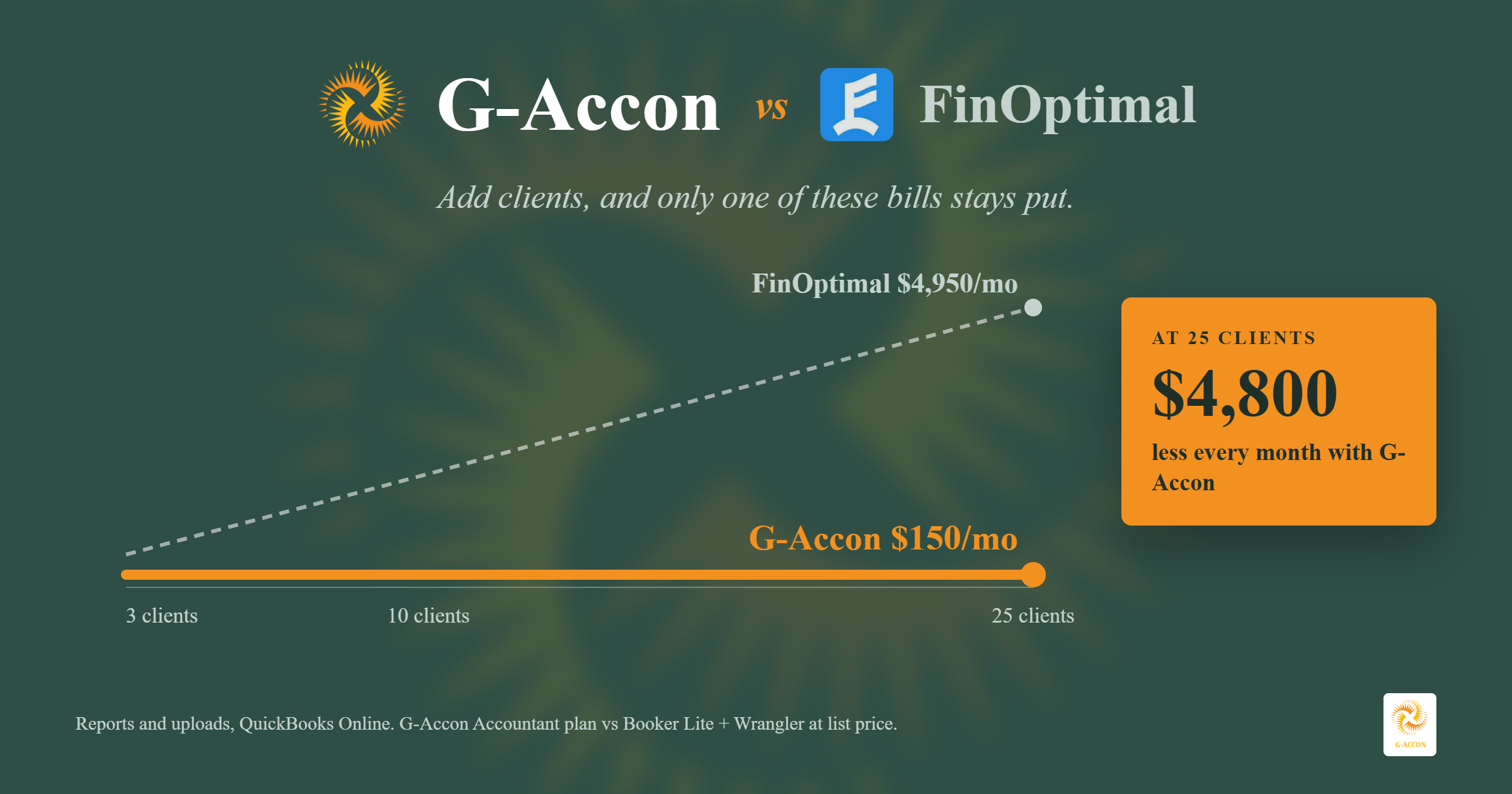
The price gap comes down to packaging. G-Accon's Accountant plan covers up to 25 companies for one monthly fee, whereas FinOptimal charges for each app on each QuickBooks file. That's fine at three clients, but at twenty it adds up quickly.
It isn’t only about price, either. G-Accon also gives you KPI dashboards, budgeting and forecasting, and multi-company consolidation, and you won’t find any of those in Wrangler, FinOptimal’s reporting app.
If you want to test that on real data, try G-Accon for QuickBooks on a couple of your own client files.
What G-Accon Is Built For
G-Accon is a Google Sheets add-on that connects to your books. Your QuickBooks numbers come into a sheet, you work with them there, and if an entry is wrong you can fix it in the sheet and send it back. Most of the people who use it are accountants and bookkeepers who already do a lot of their work in Sheets.
Reporting, consolidation, and two-way workflows in Google Sheets
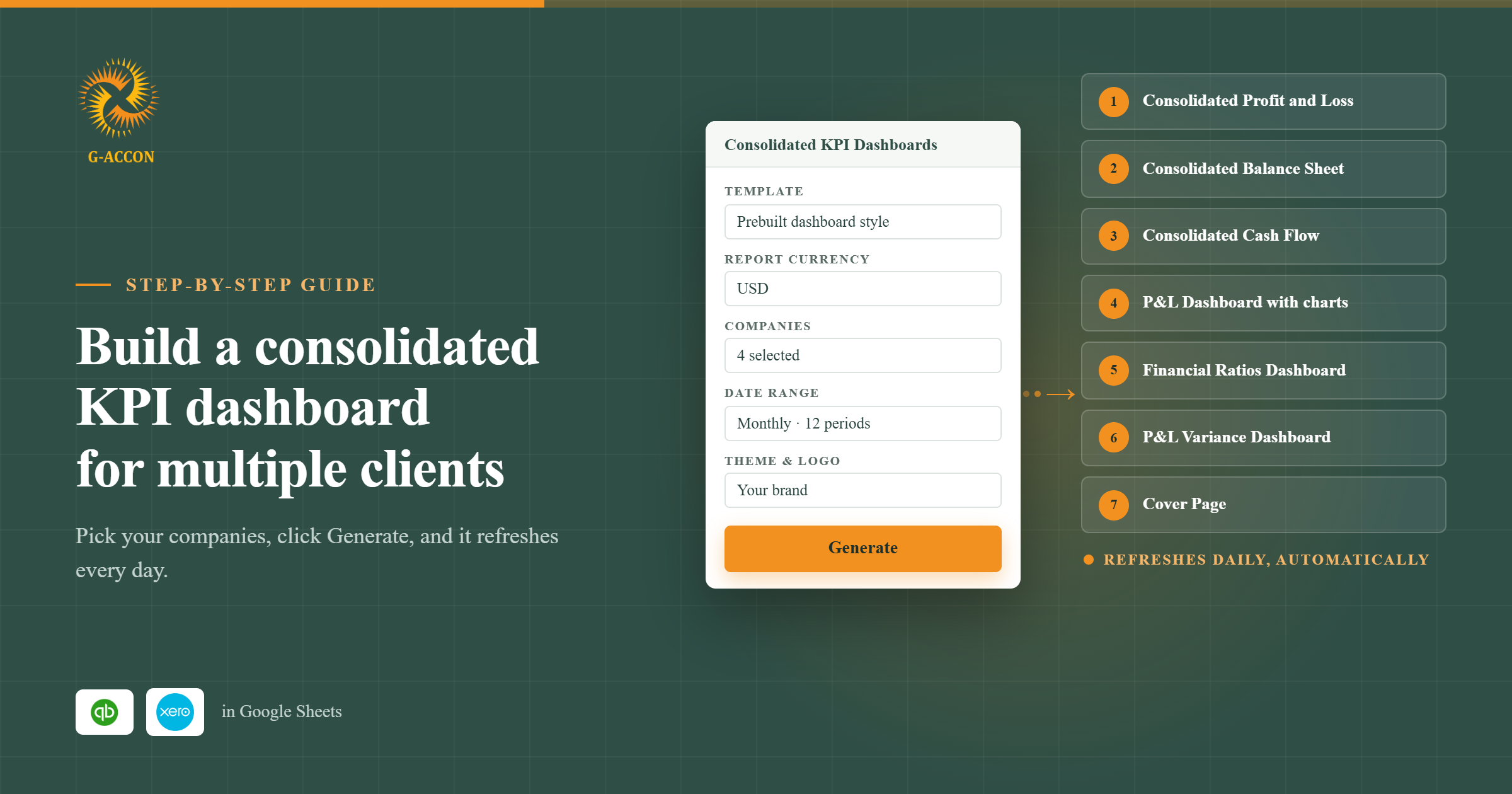
Say your firm closes the books for a dozen clients. You can pull their live QuickBooks reports into Sheets and start from one of more than 100 templates rather than a blank tab. You can also combine several clients into a single report, and currency isn't an issue because G-Accon supports more than 170 of them.
Once a report is set up, you can have it refresh every hour, day, or week and email it out as an Excel, PDF, or CSV file. On top of that, you can turn the numbers into KPI dashboards in one click, build budgets and forecasts, and feed the data into Power BI, Looker, or Tableau when a client wants something more visual.
It works in the other direction as well. If you've got journal entries, invoices, or bills in a sheet, you can upload them to QuickBooks instead of entering each one by hand.
G-Accon only works in Google Sheets, so there's no Excel version. You can still export a finished report to Excel if a client asks for one, though.
One plan instead of separate apps
This is where the two tools part ways the most. G-Accon doesn't sell reporting and uploads as two products, so every plan gets the same toolbox and you won't wake up one day needing an upgrade just to send invoices. The only thing you pick is how many companies you need.
What FinOptimal Is Built For
FinOptimal is a family of QuickBooks Online apps that you buy one by one, and it also sells a done-for-you bookkeeping service. The company is an accounting firm itself and built these tools for its own staff, which shows in how each app does one job and stays in its lane.
Accruer, Booker, and Wrangler as separate apps
Right now FinOptimal has three apps. Accruer is the one for accruals, covering prepaid expenses, deferred revenue, fixed assets, and payroll. Booker uploads spreadsheet data to QuickBooks and can also pull it back out if you want to bulk edit. Wrangler brings QuickBooks reports into a spreadsheet and keeps them updated.
Booker and Wrangler work in either Google Sheets or Excel. Accruer is different because it runs against QuickBooks directly, so you export its schedules if you want them in a sheet. FinOptimal also lists two apps as coming soon: one for bank reconciliation and one for AI close automation.
Managed accounting and the Magic Bundle
FinOptimal also offers managed accounting, where its own team uses those same apps to keep your books closed for a flat fee based on a custom scope of work.
If you want all three apps, there's the Magic Bundle: Accruer Unlimited, Booker Unlimited, and Wrangler together, starting at $339 a month per QuickBooks file.
Reporting Compared
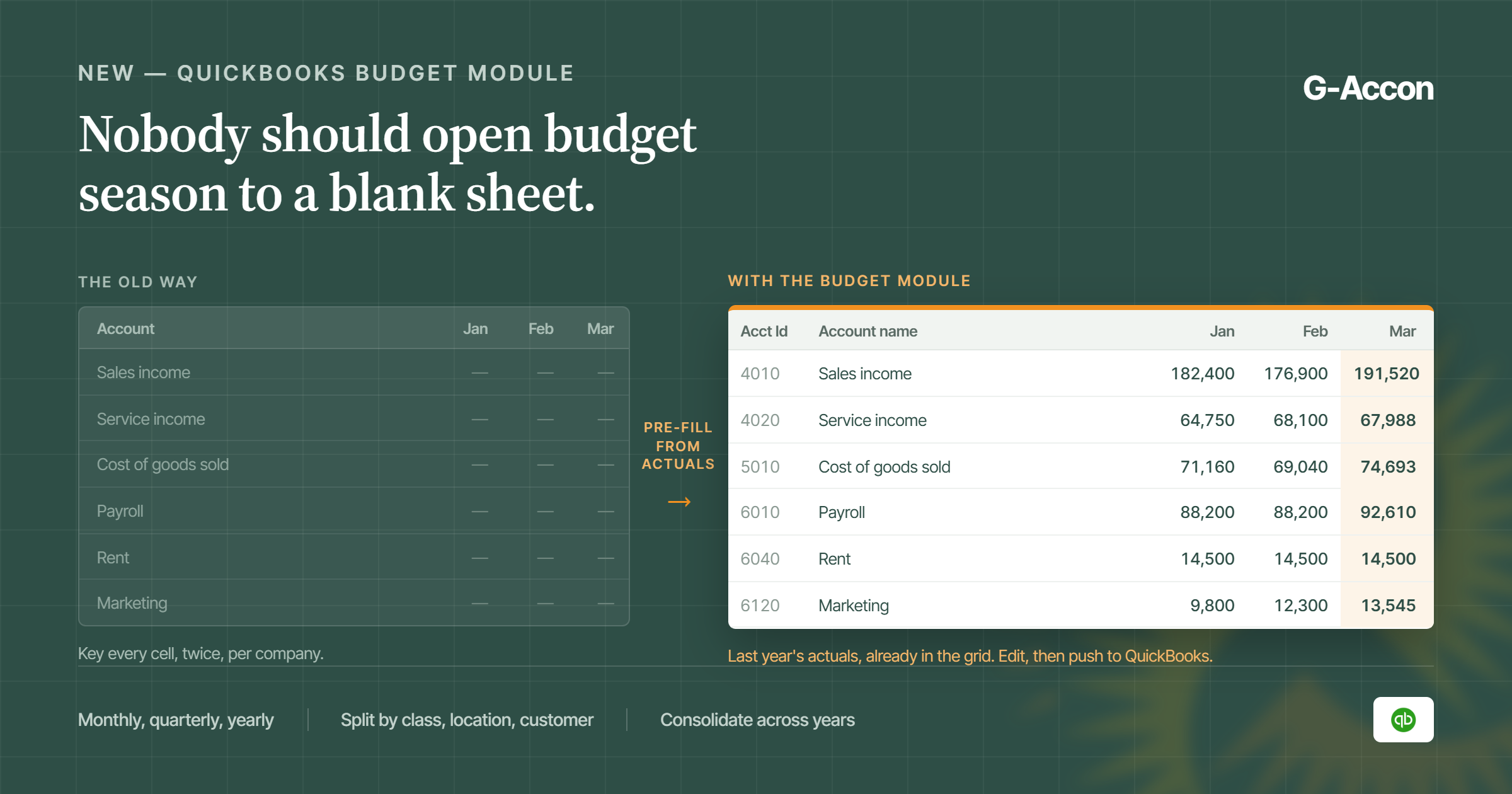
Both tools get QuickBooks reports into a spreadsheet, but G-Accon goes much further, with KPI dashboards, multi-company consolidation, and scheduled delivery on every plan, plus a new budgeting and forecasting tool.
G-Accon versus Wrangler reporting and consolidation
Getting reports into a sheet is the easy part, and both tools do it. For a firm with lots of clients, the real time savers in G-Accon are these:
- Consolidation. Merge several companies into one report, with intercompany eliminations and currency conversion handled for you. See how to start consolidating multiple QuickBooks companies.
- Scheduling. Reports update on your timetable, so nobody has to open the sheet and hit refresh.
- Delivery. Finished reports go out by email on a schedule.
- KPI dashboards. Build single-company or consolidated KPI dashboards in one click, so you’re not designing charts from scratch for every client.
- Budgeting and forecasting. G-Accon’s budgeting tool lets you set up budgets and forecasts in Sheets and compare them with what actually came through QuickBooks.
Wrangler is a solid report tool in its own right. It runs every standard QuickBooks report, plus custom queries and a detailed report FinOptimal calls the Magic Report. Refreshes and users are unlimited, you can put your own branding on reports, and it works in Google Sheets or Excel for $99 a month per QuickBooks file.
What G-Accon has that Wrangler doesn’t
Where Wrangler stops is anything past the reports themselves. If you want client dashboards, budgets you can track against actuals, or several entities rolled into one view, G-Accon handles all of that out of the box, while Wrangler doesn't offer any of it. Here's how the two line up on the features firms tend to ask about.
| Feature | G-Accon | FinOptimal Wrangler |
|---|---|---|
| KPI dashboards (single and consolidated) | Yes, built in one click | No |
| Budgeting and forecasting | Yes | No |
| Multi-entity consolidation | Yes, with intercompany eliminations | No |
| Multi-currency | Yes, 170+ currencies | No |
| BI reports for Power BI, Looker, Tableau, and similar tools | Yes | No |
| Annotations | Yes | No |
| Auditing | Yes | No |
| Open API | Yes, with the Plus add-on | No |
| Data backups for month-end reconciliation | Yes | No |
| Email notifications | Yes | No |
| Webhooks | Yes | No |
| Custom branding | Yes | Yes |
| Custom queries and automated refreshes | Yes | Yes |
Spreadsheet Data Uploads Compared
Both tools push spreadsheet records into QuickBooks, but G-Accon includes its full list of uploads on every plan, while FinOptimal splits them across two Booker tiers.
G-Accon versus Booker two-way workflows
Every tool in this space says it "supports uploads," but that phrase hides a lot. We'd look at two things: which records you can send, and whether you can fix or delete them later. Here's the breakdown.
| G-Accon (all plans) | FinOptimal Booker Lite | FinOptimal Booker Unlimited | |
|---|---|---|---|
| Price | Included in your plan | $99/mo per QuickBooks file | $149/mo per QuickBooks file |
| Journal entries | Insert, update, delete | Create, update, delete | Yes |
| Sales records | Invoices, sales receipts, refund receipts, estimates, payments, deposits | No | Invoices, sales receipts, refund receipts, credit memos |
| Purchase records | Bills, bill payments, expenses, purchase orders, vendor credits | No | Bills, expenses, checks |
| Lists | Accounts, customers, vendors, items, classes, locations, employees, terms, and more | No | Customers, vendors, classes, and more |
| Other | Budgets, transfers, time activities, scheduled uploads | Journal entries only | Bulk edit QuickBooks data |
| Spreadsheet | Google Sheets | Google Sheets or Excel | Google Sheets or Excel |
What you can do with an upload depends on the record type. Journal entries can be added, changed, or deleted, while bills can be voided and accounts can be added or updated. If your team posts the same rent or depreciation entries every month, you can also schedule the upload and let it run on its own.
We go through the setup step by step in our guide on how to sync QuickBooks and Google Sheets both ways.
Accruals and Managed Accounting
This is FinOptimal's home turf. Accruer automates accrual schedules, and FinOptimal's team can run your books for you. G-Accon doesn't try to do either, because it's built to make your own team faster, not to replace it.
Where FinOptimal covers a different job
Accruer is built for accruals. It creates and posts the entries for prepaid expenses, deferred revenue, fixed assets, and payroll. The price is per QuickBooks file and depends on how many accruals you run in a month, starting at $29 for up to 10. It goes to $99 for up to 50, and $199 gets you unlimited.
Managed accounting is a different animal altogether, because you're paying for people rather than software, and FinOptimal's staff take over the bookkeeping and the month-end close.
G-Accon doesn't run your books, but it does give your team the reports and uploads that help them close faster. If you already track accruals in a spreadsheet, you can use G-Accon to upload those journal entries to QuickBooks. The only catch is that the schedule itself stays your team's job.
Accounting Platform Coverage
FinOptimal is a QuickBooks Online shop, full stop. Besides QuickBooks Online, G-Accon also works with Xero and Xero Practice Manager, as well as Sage Accounting and FreshBooks.
This is a big deal if some of your clients use Xero. You can give them the same reports and uploads your QuickBooks clients get, set up the same way in Google Sheets, and your staff won't have to learn a second tool. Each platform does need its own G-Accon plan, so a firm using both pays for two. See G-Accon for Xero for the Xero side.
FinOptimal says Accruer works only with QuickBooks Online for now, though other systems may be supported later, so until then any Xero clients would need a separate tool.
G-Accon vs FinOptimal Pricing for Accounting Firms
G-Accon charges one plan price based on how many companies you manage, while FinOptimal charges per app, per QuickBooks file. For firms with a long client list, that makes G-Accon's list price far lower.
One plan versus separate apps
With G-Accon, reports and uploads share one plan, so there's no second product to add when a second job comes up.
With FinOptimal, every app is its own subscription, so getting reports and uploads means paying for both Wrangler and Booker. To be fair, FinOptimal doesn't charge per user, which helps larger teams.
Plans by company count versus per QuickBooks connection
G-Accon's plans are tiered by company count and number of users. These are the current G-Accon pricing plans for QuickBooks:
| Plan | Billed monthly | Billed yearly | Companies | Users |
|---|---|---|---|---|
| Business | $60/mo | $50/mo | Up to 3 | 1 |
| Accountant | $150/mo | $125/mo | Up to 25 | 5 |
| Advisor | $300/mo | $250/mo | Up to 50 | 10 |
| Enterprise | From $450/mo | From $375/mo | Up to 250 | Unlimited |
Outgrow your plan by a client or two? You don't have to jump a tier, since each extra company costs $10 a month and each extra user costs $20.
FinOptimal prices its apps per connected QuickBooks file, which means every client file needs its own subscription and the bill climbs with each new client. The FinOptimal figures in this article are its published list prices, although accounting firms can fill out a form to ask for discounted pricing.
A worked example
Let's put real numbers on it. Say a firm needs live reports and spreadsheet uploads, and:
- Every client has its own QuickBooks Online file.
- No more than 5 staff use the tool.
- The firm doesn't need Accruer.
- FinOptimal is priced at its public monthly list price, since its firm discount isn't published.
| Firm size | G-Accon Accountant plan | FinOptimal: Booker Lite + Wrangler | FinOptimal: Booker Unlimited + Wrangler |
|---|---|---|---|
| 10 clients | $150/mo ($125/mo billed yearly) |
$1,980/mo | $2,480/mo |
| 25 clients | $150/mo ($125/mo billed yearly) |
$4,950/mo | $6,200/mo |
One thing to watch is that Booker Lite only handles journal entries. If you also need to upload invoices and bills, Booker Unlimited is the fair comparison, and G-Accon's Accountant plan covers both.
Your FinOptimal quote may come in lower once you ask for firm pricing, but the shape of the bill doesn't change. FinOptimal's cost goes up with every new file, while G-Accon stays flat until you outgrow your plan, so taking on a new client doesn't mean a new line on your software bill.
Can G-Accon and FinOptimal Be Used Together?
Yes, and because both connect to QuickBooks Online, a firm could run Accruer for accrual schedules and G-Accon for reporting and uploads.
That pairing makes sense when accruals take a big, steady bite out of your team's time. The flow is simple: Accruer posts the accruals, then G-Accon picks up the fresh numbers in Google Sheets, and your team takes it from there with reports, consolidations, and scheduled emails. You'd pay for Accruer per file and for one G-Accon plan across all your clients.
G-Accon vs FinOptimal: Which Option Fits Which Firm
For most multi-client firms that want reports and uploads in Google Sheets, G-Accon gives you more for less, although FinOptimal is worth a look if accruals are your biggest headache, or if you'd like to hand off the books entirely.
G-Accon is probably your tool if you manage a lot of client companies and want one bill you can predict. It's also a good choice if you need reports and uploads, or if you often combine several companies into one report, build KPI dashboards for clients, or track budgets against actuals. Firms with a few Xero, Sage, or FreshBooks clients will find it useful too, and if your team already uses Google Sheets all day, there's not much to learn.
FinOptimal is the better call in a few cases, such as when your team loses hours every month to accrual schedules, when you'd like an outside team to do the bookkeeping and the close, or when your firm simply runs on Excel.
And if accruals are only one piece of the puzzle, you can always pair Accruer with G-Accon. Comparing other QuickBooks reporting tools too? Read G-Accon vs LiveFlow next.
Getting Started
You can try G-Accon free for 14 days, and you won't need a credit card.
The easiest way to test it is to install the add-on and connect one QuickBooks file. Pull a P&L into Sheets, then try sending one journal entry back. Give it an afternoon, and by the end you'll know whether it saves your team real hours.
FinOptimal doesn't list a free trial, but it offers a 60-day money-back guarantee, and you can cancel at any time.
Start your free trial of G-Accon for QuickBooks, or book a demo and we'll walk through your firm's setup with you.
FAQ
Is G-Accon a FinOptimal alternative?
Yes, for reporting and spreadsheet uploads, since G-Accon covers the work Wrangler and Booker do inside one Google Sheets plan, and it adds KPI dashboards, budgeting, and consolidation that Wrangler doesn't have. It isn't a replacement for Accruer or FinOptimal's managed accounting service.
Can I upload journal entries from Google Sheets to QuickBooks with G-Accon?
Yes. G-Accon can insert, update, and delete journal entries in QuickBooks, and it can also upload invoices, bills, payments, customers, vendors, and many other record types. Uploads come with every plan.
Can I use G-Accon for my Xero clients too?
Yes, and Xero is only one of the options. G-Accon also connects to Xero Practice Manager, Sage Accounting, and FreshBooks, though each platform you add comes with its own plan.
Does FinOptimal work with Google Sheets and Excel?
Booker and Wrangler both work with Google Sheets and Excel, while Accruer runs against QuickBooks and creates schedules you can export at month-end.
How much does FinOptimal cost for accounting firms?
FinOptimal prices each app per QuickBooks file: Accruer runs $29 to $199 a month, Booker is $99 or $149, and Wrangler is $99. The Magic Bundle starts at $339, and firms can ask for discounted pricing through a form on FinOptimal's site.
Does FinOptimal Wrangler have KPI dashboards or budgeting?
No. Wrangler pulls QuickBooks reports into a spreadsheet and keeps them updated, but it doesn’t offer KPI dashboards, budgeting and forecasting, multi-entity consolidation, or multi-currency reporting. G-Accon includes all four, along with BI reports, annotations, auditing, email notifications, and webhooks.