G-Accon vs Syft Analytics
TL;DR
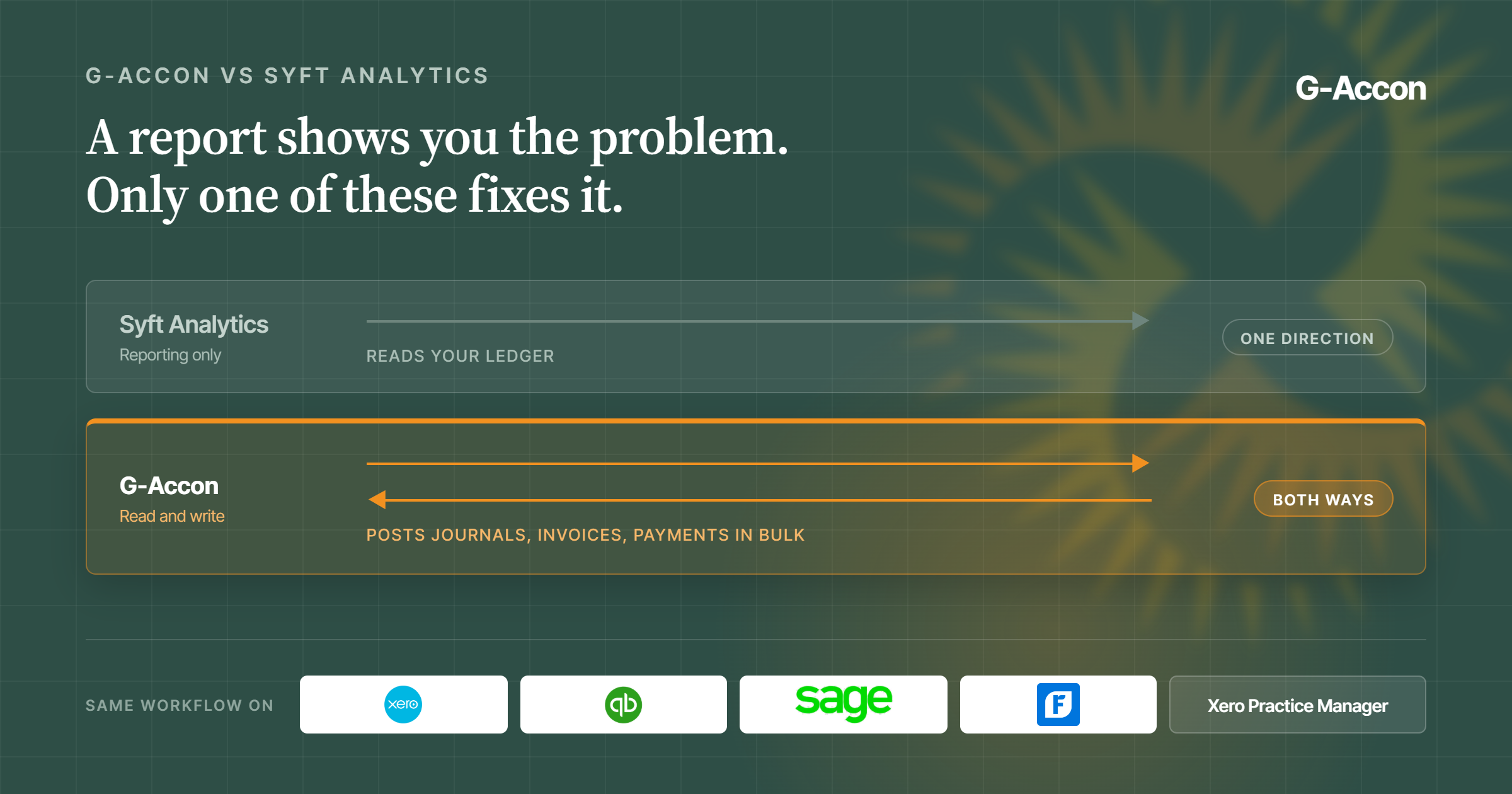
G-Accon lives in Google Sheets and talks to Xero, QuickBooks Online, Sage, FreshBooks, and Xero Practice Manager. It pulls your numbers in, and it pushes them back out, so you can post journals and invoices in bulk without leaving the sheet. Consolidation and multi-currency are included with every plan, and a single plan can cover up to 250 companies.
Syft Analytics makes good-looking reports, but Xero bought it in 2024; it charges you for each entity, and it can't write anything back. If every client you have sits on Xero, you'll probably get on fine with it. If your client list is mixed, G-Accon handles the whole lot the same way.
G-Accon vs Syft Analytics: The Short Answer
Go with G-Accon if your clients aren't all on the same accounting platform and you want to build your own reports. Go with Syft if every client is on Xero and your team won't go near a spreadsheet.
The two come at the job from different angles. Syft is an app you log into. It reads your books and hands you charts and report packs. G-Accon is a set of Google Sheets add-ons. It drops your live numbers into a sheet you already know, and it can send data back the other way.
One thing to know before you look at features. Xero bought Syft in September 2024 for up to 70 million US dollars. Syft still runs as its own app and still works with QuickBooks Online. But it belongs to one of the two big platforms now. If half your clients are on QuickBooks, think that through first.
G-Accon isn't tied to anyone. It treats every platform the same, and firms give it 4.7 out of 5 on G2 across roughly 198 reviews.
Where G-Accon Is Built Differently
Works across Xero and QuickBooks with a finance reporting workflow
G-Accon plugs into five platforms, so your team learns one way of working and uses it on every client. Xero, QuickBooks Online, Sage, FreshBooks, and Xero Practice Manager all behave the same inside Sheets. No hopping between apps depending on whose file you've opened. And when someone new joins, you teach them once.
Here's the bigger thing. Most reporting tools only read your data, and Syft is one of them. G-Accon reads and writes. From a sheet you can add, change, or delete invoices, journals, payments, bank lines, and contacts in bulk, then post the batch into Xero or QuickBooks.
That changes what the tool is good for. A read-only app can show you the accrual you forgot. It can't post it. With G-Accon, the sheet where you spot the problem is the sheet you fix it from. No export, no re-typing, no checking your own typing after.
Group work is in the box from day one, not parked behind a bigger plan. Consolidation, intercompany eliminations, and live rates for 170 plus currencies come with every plan. G-Accon also pulls companies together from different platforms. A group with one entity on Xero and another on QuickBooks lands in one sheet.
Spreadsheet-native FP&A and reporting workflows without adding another reporting silo
G-Accon runs inside Google Sheets, so there's no new app to learn, no extra login, and no second system to keep in step. Your workings, your models, and your client reports sit in one place.
It also means nobody else's layout boxes you in. That's the gripe you hear most about ready-made report packs. Once the report is built, there's barely any room to change it. In a sheet, every cell is yours. Move a heading, drop in a column, throw it out and start again.
In practice it goes like this. You build a report once, from scratch or from one of the 100 plus templates. You set it to refresh on a schedule. You add an alert, maybe for overdue invoices. You tell it to email the finished thing to your client. Then you leave it alone and it keeps going.
All of this is really about how fast you close. APQC asked 2,300 firms how long their monthly close takes. The middle of the pack needs 6.4 days. The best quarter are done in 4.8 days or less. The slowest need 10 or more. Reports and re-typing numbers by hand is where those days go.
On security, G-Accon holds a SOC 2 Type 2 attestation covering all five trust services criteria, checked by an outside auditor, plus a GDPR attestation.
Here's how the two stack up on the things firms ask about most.
| What you need | G-Accon | Syft Analytics |
|---|---|---|
| Write data back to the ledger | Yes, bulk journals, invoices, payments | No, reporting only |
| Accounting platforms | Five: Xero, QuickBooks Online, Sage, FreshBooks, XPM | Xero, QuickBooks Online and Desktop, Sage, others |
| Who owns it | Independent | Xero, since 2024 |
| Multi-entity consolidation | Every plan, and across platforms | Plus plan and up |
| Multi-currency | 170 plus currencies, live rates, every plan | 170 plus currencies, Plus plan up |
| Report layout control | Full, every cell is yours | Set report formats and templates |
| How it is priced | Per platform, up to 250 companies | Per entity, or unlimited entity plans |
| Where you work | Google Sheets, no new app | Its own web app, plus a version in Xero |
| Industry benchmarks and valuations | No | Yes |
| Security | SOC 2 Type 2 and GDPR attestation | SOC 2 and GDPR |
What Syft Analytics Does Well
Reports, dashboards, and industry benchmarks
Syft is good at handing you a finished report pack you didn't have to build. You hook up a client, pick a report, and you've got something to send. Users like the templates and the charts, and you can see why.
It also does things G-Accon doesn't, and it'd be silly to pretend otherwise. Syft gives you industry benchmarks, business valuations, and long-range forecasts. Its Syft Assist add-on uses AI to flag numbers that look odd. If showing a client how they compare to similar businesses is part of your pitch, that alone is worth a look.
Two catches. Multi-currency doesn't kick in until the Plus plan, so one small group with an overseas subsidiary can push you up a tier. And Syft only reads your books, so anything you spot, you still fix by hand.
Now built into select Xero plans
Since Xero took over, a cut-down version called "Analytics powered by Syft" comes inside some Xero plans. In the UK that's Comprehensive and Ultimate. In the US, Xero's partner offer covers Growing and Established. Xero switched it on worldwide in January 2026.
So there are two Syfts about now. The one inside Xero is lighter, for owners who just want a quick look at their numbers. The full app has the deeper stuff. Which you get depends on your client's plan and whether you're a Xero partner.
That's the deal with anything bundled. It's cheap to start, and it can change without anyone asking you. Xero has put plan prices up twice in the past year and shuffled what sits in each tier by country. A tool you picked yourself doesn't shift when your client's ledger provider rewrites its price list. It also doesn't stop at your Xero clients.
Which One Fits Your Firm
It comes down to one question. Is every client of yours on Xero, or not? Cost follows from that, because the two count in different ways. G-Accon charges per platform, and each plan covers a block of companies. Syft charges for each entity you connect.
The gap widens the more clients you take on. Say you look after 25 companies. On the Accountant plan that's 150 dollars a month, so about 6 dollars a company. Enterprise covers 250 companies for 450 a month with unlimited users, under 2 dollars each. Paying per entity doesn't bend like that. Every client you win adds a line to the bill.
| Pricing | G-Accon | Syft Analytics |
|---|---|---|
| How it is charged | Per platform, per month | Per entity, per month |
| Entry plan | Business, 60 a month or 50 billed yearly. 3 companies | Basic is free. Standard is the first paid tier |
| Mid plans | Accountant, 150 a month, 25 companies. Advisor, 300 a month, 50 companies | Plus and Advanced, priced per entity |
| Top plan | Enterprise, 450 a month or 375 yearly. 250 companies, unlimited users | Unlimited entity plans offered |
| Consolidation included | Every plan | Plus plan and up |
| Free trial | 14 days, no card | 14 days, plus free Basic tier |
All figures in US dollars. G-Accon's full pricing is on the pricing page. Syft charges per entity and prices move with billing term, so check them at signup before you budget.
Choose G-Accon if…
- Your clients sit on more than one platform and you want one way of working for all of them.
- You need to push data back into the ledger, not just pull reports out.
- You want to lay reports out your own way instead of living with someone else's format.
- You look after groups and don't want to pay more for consolidation and live currency rates.
- You're taking on clients and would rather not pay again for each one.
- You'd rather your reporting didn't run on a tool owned by your clients' ledger provider.
Choose Syft (or Xero's built-in Analytics) if…
- Every client you have is on Xero, and you can't see that changing.
- Benchmarks and valuations are a big part of what you sell.
- You only ever need to read and present numbers, never post them.
- Your team won't work in a spreadsheet, and that's that.
Not many firms stay on one platform for long. Every client you win on QuickBooks, every group with a subsidiary on Sage, is one more thing a Xero-first tool can't reach. G-Accon was built for a mixed client list. Try it free for 14 days, no card.
FAQ
Can G-Accon send data back into my accounting system?
Yes, and it's the biggest split between the two. From a sheet, G-Accon can add, change, and delete invoices, journals, payments, bank lines, and contacts in bulk, then post them into Xero or QuickBooks. Syft reads your data but can't write back.
Does G-Accon work with QuickBooks as well as Xero?
It does. G-Accon links Google Sheets to QuickBooks Online, Xero, Sage, FreshBooks, and Xero Practice Manager, with two way sync on all of them. Each platform is its own plan, and each plan covers a block of companies.
Which one is better for multi-entity consolidation?
G-Accon, for two reasons. Consolidation and live currency rates come with every plan, so you're not paying up a tier for them. And it pulls together companies from different platforms, so a group with one entity on Xero and another on QuickBooks lands in one sheet. With Syft, multi-currency starts at Plus.
Is Syft Analytics still its own product after the Xero deal?
For now, yes. Xero says Syft will keep running as its own app whatever accounting software you use, and it still works with QuickBooks Online. Just remember who decides what happens to it next.
Do I get Syft free with Xero?
Sometimes. A cut-down version comes with some Xero plans, like Comprehensive and above in the UK. Xero partners can get the full app when clients are on qualifying plans, which in the US means Growing and Established. Otherwise you pay per entity, and what you get depends on your client's plan and country.
Is G-Accon safe enough for client data?
Yes. G-Accon holds a SOC 2 Type 2 attestation covering all five trust services criteria, checked by an outside auditor, plus a GDPR attestation. Your data stays in your own Sheets and your own accounting platform.